Journal entries and reversals
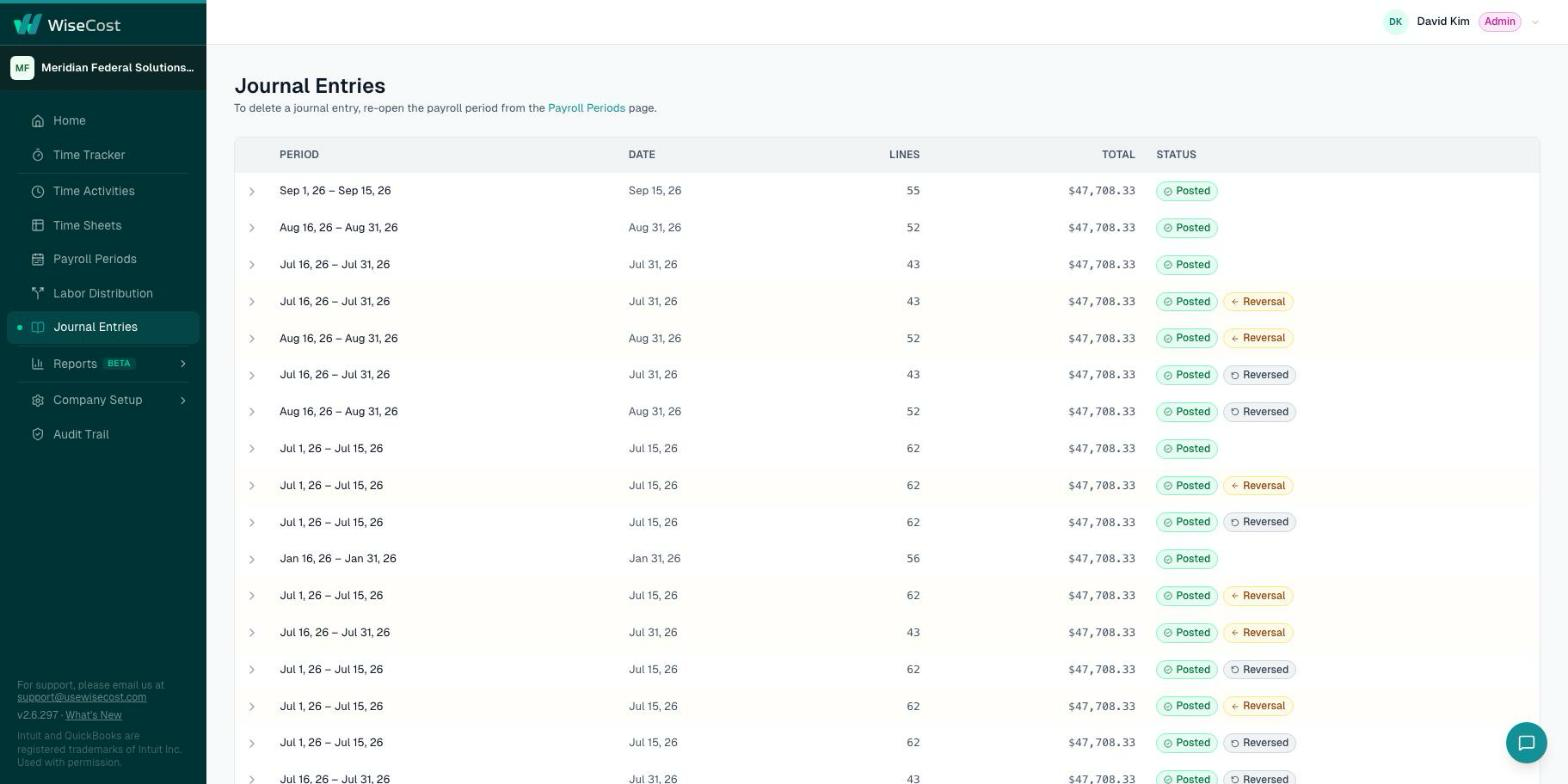
Every labor distribution posts a journal entry to QuickBooks Online. See its lines in WiseCost, and the reversal entries created when a period is reopened.
Every labor distribution you post in WiseCost becomes a journal entry in QuickBooks Online. The Journal Entries page in WiseCost lists each entry with its lines, accounts and classes, and the reversal entries created when a posted period was reopened. You never need to edit a labor journal entry by hand in QuickBooks Online.
Who this is for: Administrators, and the CPA or accountant who reviews the books.
What is in the journal entry
- Debit lines, one per employee and contract. Each line carries the contract (Class or Project), the employee, the account and the amount. Time charged to internal accounts, such as PTO or overhead labor, posts to those accounts.
- Employer taxes and benefits, when you included them. They are separate lines labeled "employer taxes & benefits", never mixed with direct labor.
- One credit line that balances the entry, against the credit account of the run.
- Locations. If your company uses Locations, each line is posted with its QuickBooks Location.
Rules WiseCost applies
- Amounts are rounded to the cent, and the rounding difference is applied to the employee's largest line.
- A payroll period that crosses two months posts one journal entry per month.
- The debit account of a contract is the Default debit account of its Class or Project.
Reversals
Reopening a posted payroll period never deletes its journal entry. WiseCost posts a reversal entry to QuickBooks Online that cancels the original, and both remain visible. When you run Labor Distribution again, a new corrected entry is posted. The Journal Entries page shows the three: original, reversal and corrected.
How to do it is in Reopening a payroll period or timesheet.
Reconciling
The Labor Distribution report reads from these posted entries, so its totals match QuickBooks Online. For a system-to-system reconciliation, the WiseCost API exposes the posted journal lines.
Common questions
Should I edit the journal entry in QuickBooks Online if something is wrong?
No. Reopen the period in WiseCost, fix the source (the timesheet or the pay) and post again. That keeps the reversal and the correction on record.
Why do I see two journal entries for one payroll period?
Either the period crosses two months, which posts one entry per month, or the period was reopened, which adds a reversal and a corrected entry.
Further reading from the WiseCost blog
How We Made Labor Distribution in QuickBooks Audit-Ready, and Why We Filed a Patent
WiseCost filed a provisional patent on its QuickBooks Online labor distribution method. Here's what the method does, and why it holds up when an auditor starts asking questions.
Labor Distribution in QuickBooks: Spreadsheet vs. Add-On vs. ERP
If you run on QuickBooks Online, you have three ways to handle DCAA labor distribution: a spreadsheet, a generic add-on, or a full ERP. Here's how they compare — and what to actually look for.