Employer taxes, benefits and adjustments
Post employer taxes and benefits by contract in WiseCost as separate lines, never mixed with direct labor, and add per-period adjustments or exclusions.
To post employer taxes and benefits by contract in WiseCost, import the period's payroll and tick Include employer costs (taxes + benefits) from the imported payroll in the distributed amount on the Employee Review step of Labor Distribution. WiseCost distributes them across the same contracts as the employee's hours and posts them as separate lines, "Employer taxes & benefits", never mixed with direct labor.
Who can do this: an Administrator.
Include employer taxes and benefits
- In Labor Distribution, open the period and go to Employee Review.
- Import the payroll of the period. See Importing payroll from Gusto, ADP or Paychex. The employer costs come from that file.
- Tick Include employer costs (taxes + benefits) from the imported payroll in the distributed amount.
- Check each employee's row. Under the pay you now see the employer costs, labeled as a separate line.
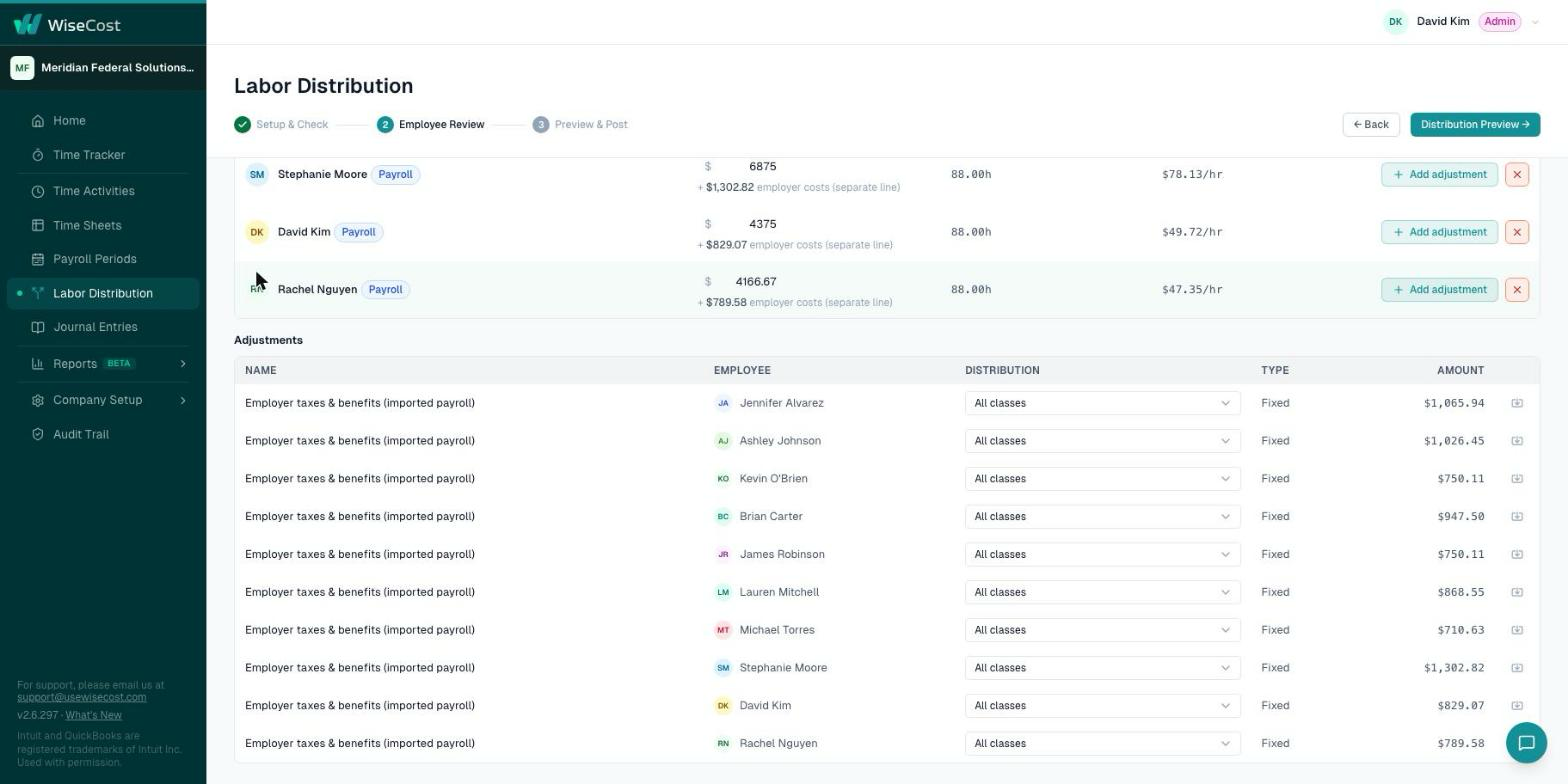
In the preview and in QuickBooks Online, each contract gets its labor line and, apart from it, its "employer taxes & benefits" line. Keeping them apart matters: direct labor is usually the base of your fringe rate, so mixing employer costs into it would distort your indirect rates.
Whether to distribute employer costs by contract or leave them in a fringe pool is an accounting decision. Ask your CPA which one fits your cost structure.
Add an adjustment
An adjustment is an amount you add for one employee in one payroll period, outside their regular pay, for example a bonus or a correction.
- On Employee Review, click Add adjustment on the employee's row.
- Enter its name and amount, and choose how it is distributed: across all the employee's classes or to a specific one.
- It appears in the Adjustments section under the employee list, where you can review or remove it.
Adjustments belong to that period only.
Exclude an employee from a run
Use the remove button on the employee's row to leave them out of this distribution. The other employees are not affected.
Rounding and the balancing line
Amounts are rounded to the cent. The rounding difference goes to the employee's largest line, so each person's distributed total equals their pay exactly. One credit line balances the whole entry against your credit account.
Common questions
How do I post employer taxes and benefits by contract?
Import the period's payroll, tick the option to include employer costs on Employee Review, and post. They go to each contract in proportion to the employee's hours, as separate lines.
Are employer taxes added to direct labor?
No. They are always posted as separate "Employer taxes & benefits" lines.
Do adjustments carry over to the next period?
No. An adjustment applies to the payroll period where you added it.
Further reading from the WiseCost blog
How to Classify Indirect Costs (Fringe, Overhead, and G&A)
What counts as an indirect cost, and how to tell whether it belongs in Fringe, Overhead, or G&A, plus the unallowable costs that never reach an invoice.
The Right Chart of Accounts for GovCon in QuickBooks Online
A step-by-step guide to structuring your QuickBooks Online chart of accounts for DCAA compliance. Built for small and mid-size Government Contractors.
Reviewed by a CPA