Setting up WiseCost for DCAA
Set up WiseCost for DCAA timekeeping: apply the DCAA preset, assign approvers, enable indirect time, turn on reminders and post labor every period.
To set up WiseCost for DCAA timekeeping, apply the DCAA preset in Company Setup → Company settings → Compliance, assign an approver to every employee, enable internal time so each day adds up, and run Labor Distribution every payroll period. The preset turns off future-dated entries, self-approval and distributed tracking, and requires employee certification and a different approver.
Who can do this: an Administrator. This path is for government contractors: cost-type and T&M contracts, a pre-award survey (SF-1408), a floor check or an incurred cost audit.
What DCAA looks at
The Defense Contract Audit Agency (DCAA) does not approve software. It evaluates whether your accounting system can do certain things. For labor, those are: employees record their own time daily, by contract and cost category; a supervisor approves it; corrections leave a trace; and labor cost is distributed to contracts and reconciles to the general ledger. For the background, read What DCAA compliance actually means.
1. Apply the DCAA preset
- Go to Company Setup → Company settings → Compliance.
- Click DCAA.
- Read the dialog, which lists the switches that will change and warns you if employees on distributed tracking will be moved back to time entries.
- Confirm.
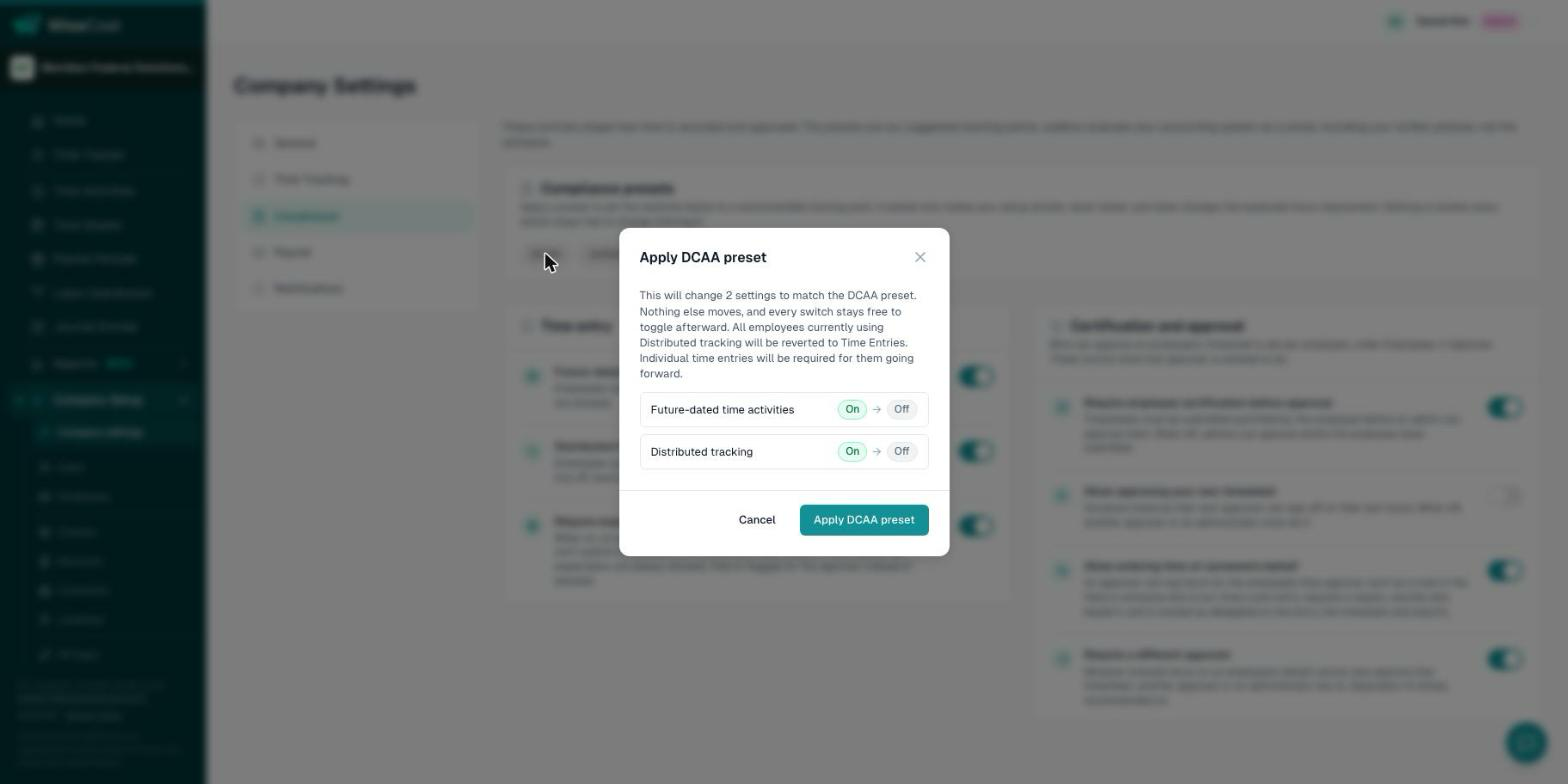
The result: future-dated time activities off, approving your own timesheet off, employee certification required, a different approver required, distributed tracking off. Details of each switch are in Compliance presets and settings.
2. Set up contracts and the entry form
- Choose whether your contracts are Classes or Projects in Configuring the time entry form.
- Enable the indirect accounts your team charges when they are not on a contract: overhead, G&A, bid and proposal, PTO, holiday. See Internal and indirect time.
3. Assign approvers
Give every employee an Approver, and a Backup approver if you can, in Company Setup → Employees. Pick the person who knows the work. See Approvers and supervisors.
4. Decide on total time accounting
If your policy is that salaried staff record all hours worked, enter their Expected hrs/week and turn on Require expected hours to submit. The preset leaves that switch alone. See Requiring expected hours.
5. Turn on reminders
Daily timekeeping needs a nudge. Set the due-soon and overdue reminders and the escalation to the approver in Timesheet notifications and reminders.
6. Run the cycle every period
- Employees log time daily and submit their timesheet. Send them the For employees guide.
- Approvers approve or reject.
- You run Labor Distribution and post the journal entry to QuickBooks Online.
- You assign account roles once, and the Indirect Rate report gives you fringe, overhead and G&A.
What WiseCost does not do for you
Write and distribute your timekeeping policy, train your employees, and keep your chart of accounts clean. An auditor evaluates the whole system, including those.
Common questions
What is the difference between the DCAA preset and the Uniform Guidance preset?
They set the same four controls. The DCAA preset also turns distributed tracking off, because DCAA expects employees to record their own time daily.
Can I change a switch after applying the DCAA preset?
Yes. Nothing is locked. The chip changes to Custom and the change is recorded in the Audit Trail.
Is WiseCost DCAA approved?
There is no such approval. DCAA does not approve or certify software. It evaluates your accounting system as a whole.
Further reading from the WiseCost blog
Setting Up Your Accounting System for Your First Cost-Type Government Contract
A seven-step guide to setting up a DCAA-ready accounting system before your first cost-type contract — chart of accounts, timekeeping, labor distribution, and policies.
Reviewed by a CPA
How to Make QuickBooks Online DCAA-Compliant: A Step-by-Step Guide
You already run on QuickBooks Online and just landed — or are chasing — a cost-type government contract. Here's how to make it DCAA-compliant step by step, without ripping out your books for an ERP.