Configuring the time entry form
Choose in WiseCost whether time is charged to a QuickBooks Project or Class, and which fields (Item, Location, Description) employees see or must fill in.
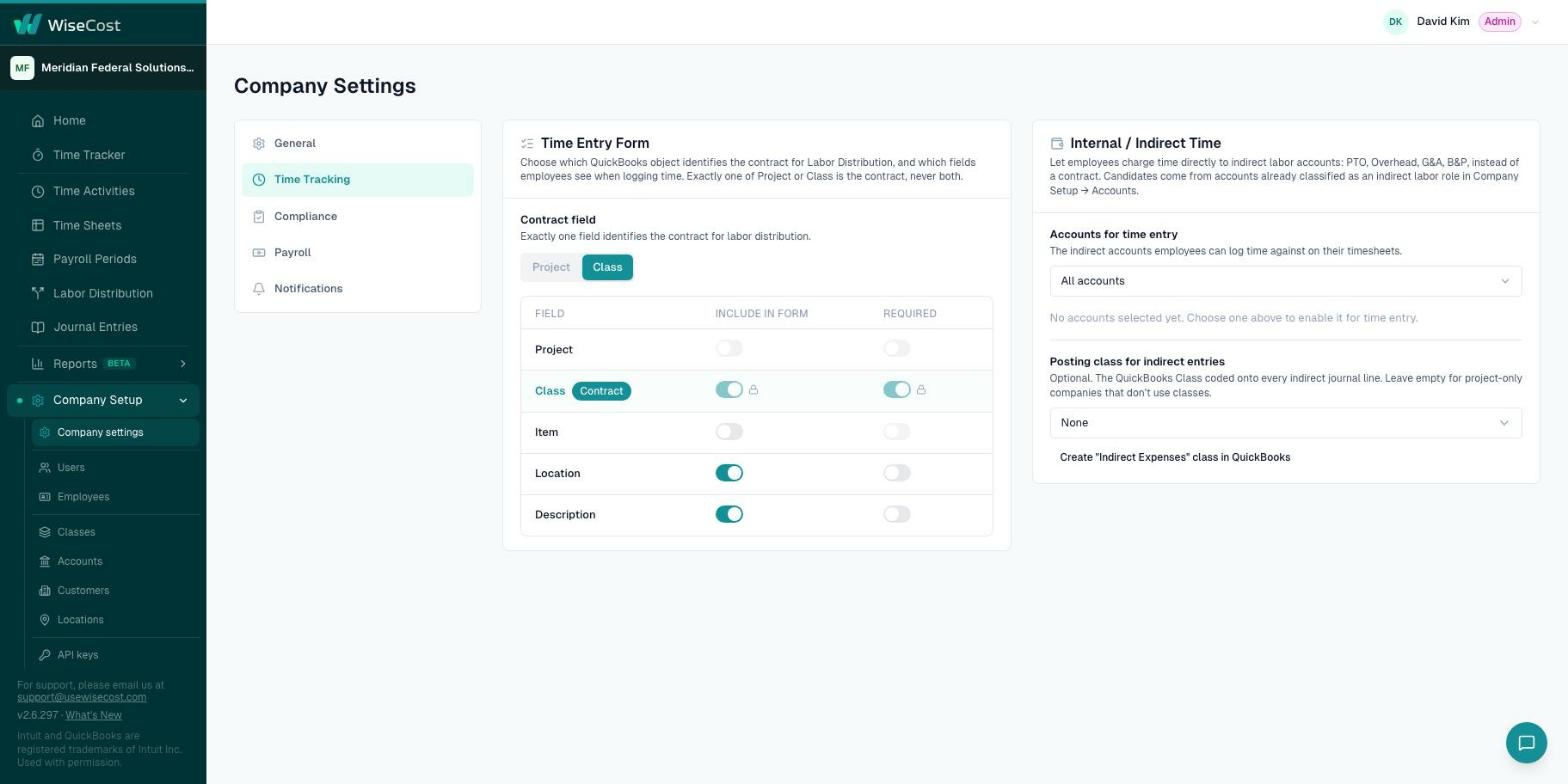
To configure what employees fill in when they log time in WiseCost, go to Company Setup → Company settings → Time Tracking. In the Time Entry Form card, choose the Contract field (Project or Class, never both) and then decide, field by field, what is included in the form and what is required.
Who can do this: an Administrator.
Choose the contract field
The contract is what time is charged to: the government contract, the grant or federal award, the task order. In WiseCost exactly one QuickBooks object identifies it for Labor Distribution.
- Go to Company Setup → Company settings → Time Tracking.
- Under Contract field, click Project or Class.
Choose Class if you track contracts or awards as QuickBooks Classes. Choose Project if you track them as QuickBooks Projects. The contract field is always included in the form and always required.
Choose the other fields
The table lists Project, Class, Item, Location and Description. Each has two switches: Include in form and Required.
| Field | What it is |
|---|---|
| Project or Class | The contract. Locked on, because every entry needs one. |
| Class (in Project mode) | Can be included as a secondary tag on top of the Project. |
| Item | A QuickBooks service item, for example the labor category or the role on the contract. |
| Location | A QuickBooks Department or Location. See Using QuickBooks Locations. |
| Description | A short note about the work. |
- Turn on Include in form for every field your team should see.
- Turn on Required for the ones they must fill in.
What happens next
The form your team sees in Time Tracker changes right away. Entries that are already logged are not modified. If you make a field required, employees cannot save a new entry without it. The most common case is "Location is required".
Time that does not belong to a contract, such as PTO, holiday or overhead, is set up on the same tab. See Internal and indirect time.
Common questions
Can employees charge time to a Project and a Class at the same time?
One of them is the contract. In Project mode you can include Class as a secondary tag, so an entry carries both, but Labor Distribution allocates by the contract field.
Should I make Description required?
That is a policy decision. Many DCAA contractors and grant recipients require it, because a description supports what the hours were for. Your CPA can advise.