Internal and indirect time: PTO, holiday and overhead
Let employees log PTO, holiday, overhead and other indirect time in WiseCost by enabling indirect labor accounts in Company settings → Time Tracking.
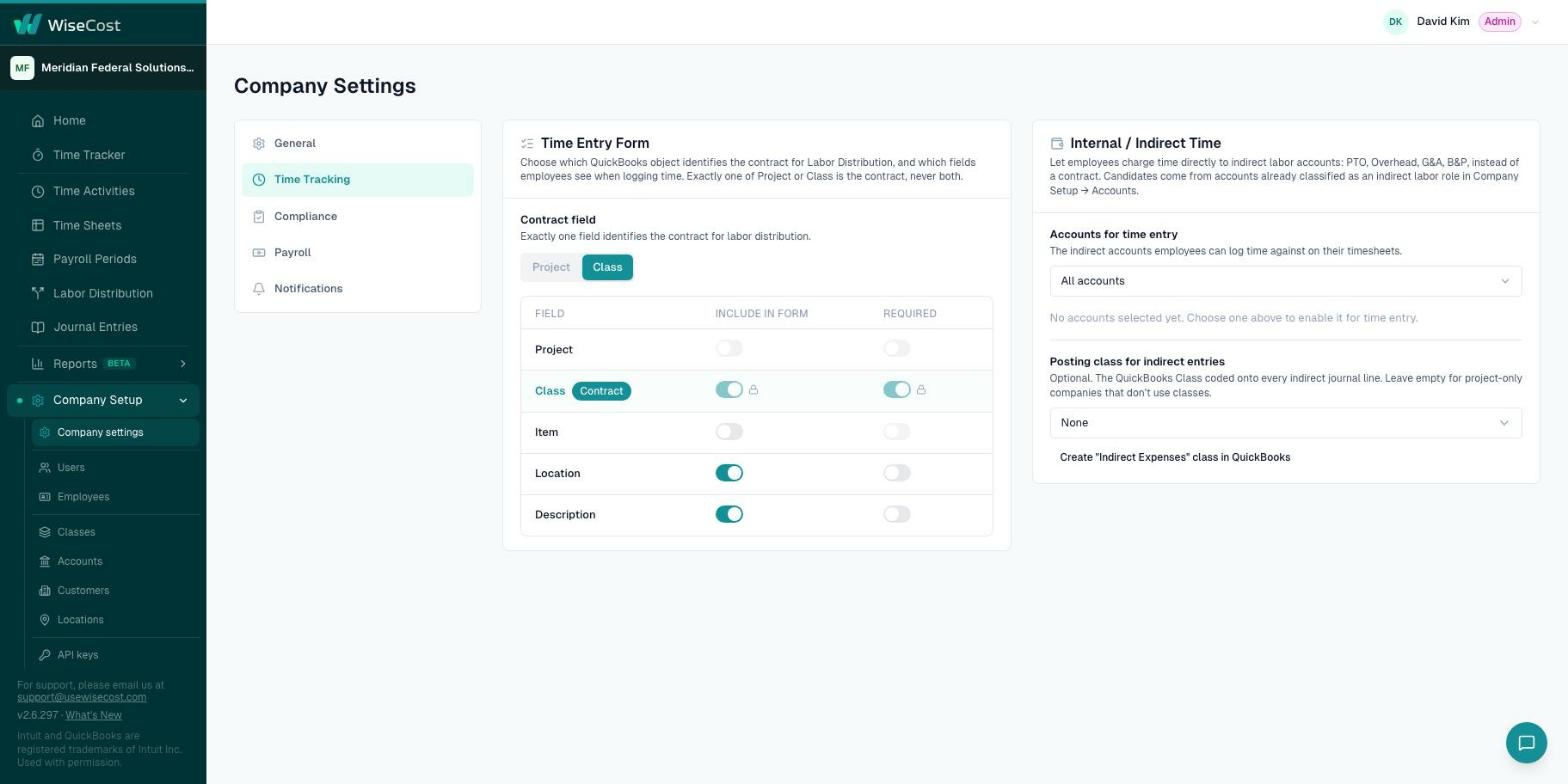
Internal or indirect time is time that does not belong to a contract: PTO, holiday, overhead, G&A, bid and proposal. To let your team log it in WiseCost, go to Company Setup → Company settings → Time Tracking and, in the Internal / Indirect Time card, choose the indirect labor accounts they can charge time to. Employees then pick one of those accounts instead of a contract.
Who can do this: an Administrator.
Before you start
The accounts offered come from accounts already classified with an indirect labor role in Company Setup → Accounts. If the list is empty, assign roles first. See Assigning account roles.
Enable accounts for time entry
- Go to Company Setup → Company settings → Time Tracking.
- In the Internal / Indirect Time card, open Accounts for time entry.
- Select each indirect account your team can log time against, and give it an alias your team will recognize, such as "PTO" or "Holiday".
- Optional: under Posting class for indirect entries, choose the QuickBooks Class coded onto every indirect journal line. Leave it empty if your company uses Projects and no Classes.
What happens next
When employees log time they see the enabled accounts, by their alias, next to their contracts. Labor Distribution posts that labor cost to the indirect account, which keeps direct labor and indirect labor apart in QuickBooks Online and feeds the Indirect Rate report.
Why it matters
Both DCAA timekeeping and time and effort reporting under the Uniform Guidance expect a record of all the time an employee works or is paid for, not only the hours charged to a contract or award. Internal time is how the day adds up. If you also require expected hours, it is what lets an employee reach their total in a week with a holiday.
Common questions
Where do employees log PTO or a holiday?
In the same Time Tracker. They choose the internal account, for example "PTO", instead of a contract.
The account I need is not in the list. Why?
Only accounts with an indirect labor role appear. Give the account its role in Company Setup → Accounts and come back.
Further reading from the WiseCost blog
5 DCAA Compliance Mistakes That Small Contractors Keep Making
The same DCAA compliance mistakes appear in CPA practices repeatedly. Five preventable issues — and how to fix each one before they become audit findings.
Reviewed by a CPA
Direct vs. Indirect Costs in Government Contracting: A Practical Guide
A practical guide to understanding and classifying direct and indirect costs for government contracts. Includes pool structures, allocation methods, and common mistakes.
Reviewed by a CPA
How to Classify Indirect Costs (Fringe, Overhead, and G&A)
What counts as an indirect cost, and how to tell whether it belongs in Fringe, Overhead, or G&A, plus the unallowable costs that never reach an invoice.