Compliance presets and settings
WiseCost has DCAA and Uniform Guidance compliance presets. A preset only makes your timekeeping switches stricter, locks nothing, and can be adjusted.
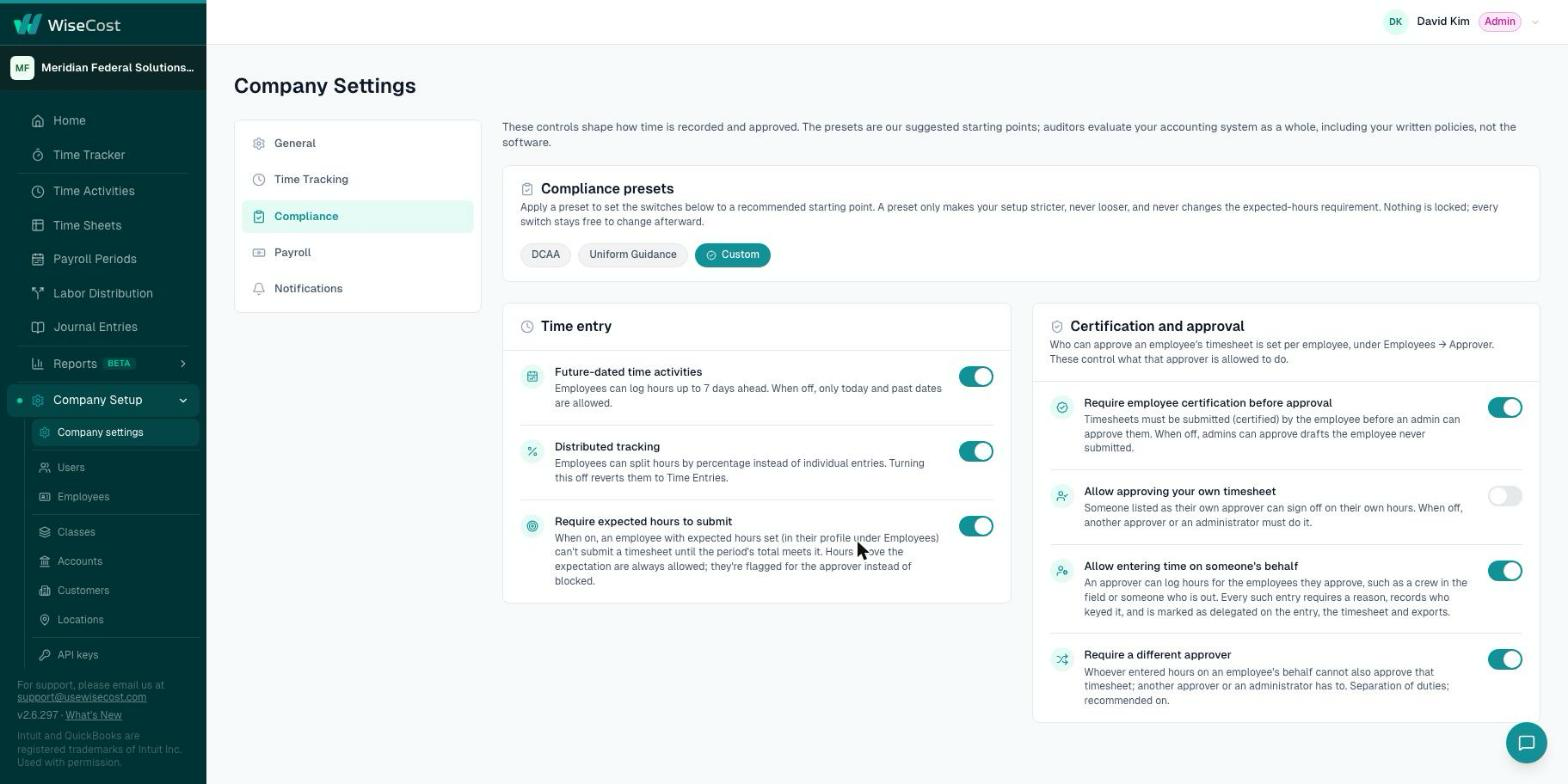
All of WiseCost's timekeeping controls live in Company Setup → Company settings → Compliance. At the top, the Compliance presets card has three chips: DCAA, Uniform Guidance and Custom. Click DCAA or Uniform Guidance to set the switches below to a recommended starting point, after a dialog that lists exactly what will change. A preset only makes your setup stricter, never looser, and nothing is locked: every switch stays free to change afterward.
Who can do this: an Administrator.
These controls shape how time is recorded and approved. The presets are our suggested starting points; auditors evaluate your accounting system as a whole, including your written policies, not the software.
How presets work
- A preset is a starting point, not a state the company is in. There is no master switch.
- DCAA and Uniform Guidance can be clicked. Custom cannot: it shows as selected when your current settings do not match either preset.
- The selected chip is calculated from your current switches. If you apply DCAA and later change one switch, the chip moves to Custom by itself.
- Applying a preset only moves switches toward the strict position. It never makes anything more permissive, and it never changes Require expected hours to submit.
Apply a preset
- Go to Company Setup → Company settings → Compliance.
- Click DCAA or Uniform Guidance.
- Read the dialog. It lists only the switches that will actually change.
- Confirm.
| Switch | Uniform Guidance preset | DCAA preset |
|---|---|---|
| Future-dated time activities | Off | Off |
| Allow approving your own timesheet | Off | Off |
| Require employee certification before approval | On | On |
| Require a different approver | On | On |
| Distributed tracking | Not changed | Off |
| Allow entering time on someone's behalf | Not changed | Not changed |
| Require expected hours to submit | Not changed | Not changed |
The two setup paths are in Setting up WiseCost for DCAA and Setting up WiseCost for the Uniform Guidance.
The Time entry card
- Future-dated time activities. On: employees can log hours up to 7 days ahead. Off: only today and past dates.
- Distributed tracking. On: salaried employees can have their time split by percentage instead of individual entries. Turning it off moves those employees back to time entries, after a confirmation. See Distributed tracking for salaried employees.
- Require expected hours to submit. On: an employee with expected hours set cannot submit a timesheet until the period's total meets them. Hours above are always allowed and flagged for the approver. See Requiring expected hours.
The Certification and approval card
Who can approve an employee's timesheet is set per employee, in Company Setup → Employees. These switches control what that approver is allowed to do.
- Require employee certification before approval. Timesheets must be submitted by the employee before anyone can approve them. Submitting is the employee's certification.
- Allow approving your own timesheet. Off: someone listed as their own approver cannot sign off on their own hours. Another approver or an administrator must.
- Allow entering time on someone's behalf. On: an approver can log hours for the employees they approve, with a reason. See Entering time for a team member.
- Require a different approver. On: whoever entered hours on an employee's behalf cannot also approve that timesheet. Separation of duties.
Every change is recorded
Each change on this tab goes to the Audit Trail with its old value and its new value, so you can always show when a control was changed and by whom.
Common questions
Does applying a preset lock my settings?
No. A preset locks nothing. You can change any switch afterward, and the selected chip becomes Custom.
Why does my company show Custom?
Your current switches do not match the DCAA preset or the Uniform Guidance preset exactly. Custom is not an error. It only describes your configuration.
Can a preset make my setup less strict?
No. Presets only move switches toward the strict position.
Does a preset make my company compliant?
No. The controls shape how time is recorded and approved. Auditors evaluate your accounting system as a whole, including your written policies.