How WiseCost works with QuickBooks Online
WiseCost syncs accounts, employees, classes, projects, items and locations from QuickBooks Online and posts labor distribution journal entries back to it.
WiseCost reads your master data from QuickBooks Online and posts labor cost back to it. Accounts, employees, contractors, classes, customers, projects, items and locations are synced from QuickBooks Online; your team tracks and approves time in WiseCost; Labor Distribution posts a journal entry to QuickBooks Online. QuickBooks Online remains your book of record.
Who this is for: Administrators.
The flow in one line
Set up your contracts in QuickBooks Online, track and approve time in WiseCost, run Labor Distribution, and WiseCost posts the journal entry to QuickBooks Online.
What is synced from QuickBooks Online
| QuickBooks Online | In WiseCost | Used for |
|---|---|---|
| Chart of accounts | Company Setup → Accounts | Posting accounts, internal time and indirect rate roles |
| Employees | Company Setup → Employees | Who logs time, pay, approvers |
| Contractors (1099 vendors) | Company Setup | Contractors who log time |
| Classes | Company Setup → Classes | Contracts or awards, when your contract field is Class |
| Customers | Company Setup → Customers | The customer behind each contract |
| Projects | Company Setup → Projects | Contracts or awards, when your contract field is Project |
| Items | Company Setup → Items | Optional service item on a time entry |
| Departments or Locations | Company Setup → Locations | Optional location tag on time entries and journal lines |
A contract in WiseCost is what time is charged to. Depending on your setup it is a QuickBooks Class or a QuickBooks Project, never both. You choose it in Configuring the time entry form.
How changes arrive
Changes you make in QuickBooks Online reach WiseCost on their own. If you need them right now, click Re-Sync on the matching page under Company Setup.
An employee terminated in QuickBooks Online shows a Terminated badge in WiseCost and keeps all their history.
Creating records from WiseCost
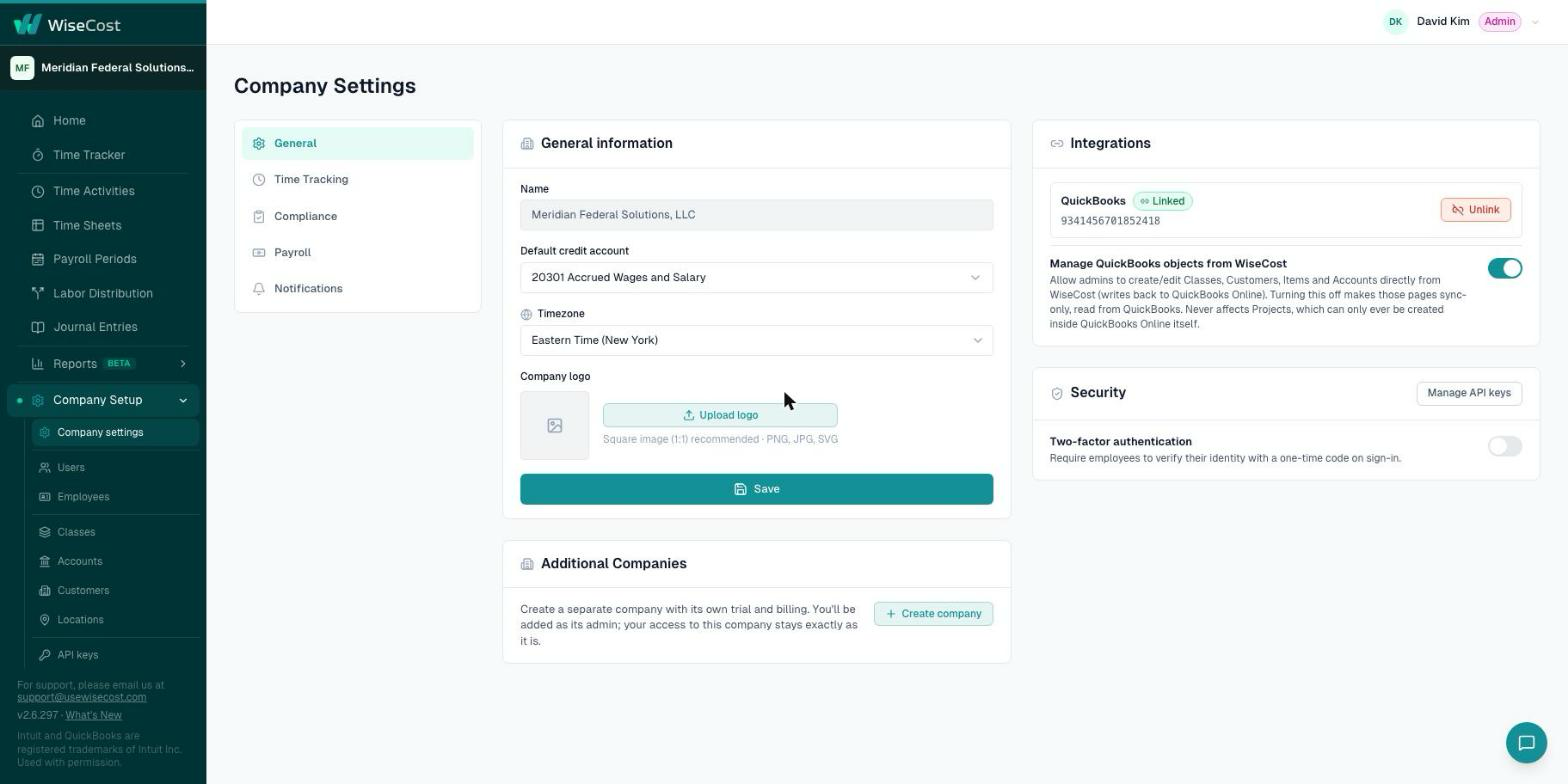
In Company Setup → Company settings → General → Integrations there is a toggle, Manage QuickBooks objects from WiseCost.
- On: admins can create and edit classes, customers, items and accounts from WiseCost, and the change is written to QuickBooks Online.
- Off: those pages are read-only in WiseCost. You cannot create, activate or deactivate classes, customers, items, accounts, locations or employees from WiseCost, and everything is managed in QuickBooks Online.
Projects are the exception: they can only be created in QuickBooks Online. See Creating Projects in QuickBooks Online.
What WiseCost writes to QuickBooks Online
- The journal entry of each labor distribution, and its reversal if you reopen a posted period. See Journal entries and reversals.
- Time activities, when an admin sends them from Time Activities.
- Records created or edited from WiseCost, when Manage QuickBooks objects from WiseCost is on.
Without a connection
If QuickBooks Online is not connected, the pages under Company Setup show a banner to connect and hide Re-Sync. You can still work with local employees and classes. See Using WiseCost before you connect QuickBooks Online.
A company cannot switch itself to a different QuickBooks Online company. Write to support@usewisecost.com for that.
Common questions
Does WiseCost post to QuickBooks Online automatically?
No. Nothing is posted until an admin reviews the labor distribution and clicks Post Journal Entry.
I changed something in QuickBooks Online and WiseCost does not show it. What do I do?
Open the matching page under Company Setup and click Re-Sync. More in QuickBooks Online changed and WiseCost did not.
Does WiseCost work with QuickBooks Online Essentials?
Yes. QuickBooks Online Essentials has no Classes, so those companies work with local classes created in WiseCost.