DCAA Compliance Software· · 12 min read
WiseCost vs QuickBooks Time: What Intuit's Time Tracker Covers for DCAA
QuickBooks Time has a DCAA setting for daily timesheets and an audit trail. Labor distribution, indirect rates and costs by contract are left to you. Here is what each tool covers and how they fit with QuickBooks Online.
If your books are in QuickBooks Online, QuickBooks Time is the time tracker you already have, or can turn on with a payroll upgrade. For a small government contractor, the natural question is whether it is enough for DCAA. This guide is for owners and bookkeepers asking that question, whether a first cost-type or T&M contract is coming or you are getting ready for a pre-award accounting system review. It explains what Intuit's tool does for DCAA, what it leaves to you, and where WiseCost fits.
The short answer
QuickBooks Time can be set up for DCAA timekeeping. Its DCAA compliance setting sends daily reminders, has employees enter their hours at the end of each workday, and keeps an audit trail of who edited a timesheet, when and why. QuickBooks Online Payroll can also assign each paycheck to classes or projects.
Labor distribution from approved hours and pay, fringe, overhead and G&A rates, and a profit and loss by contract loaded with those rates are calculated outside QuickBooks, in a spreadsheet or another tool. For the process as a whole, Intuit recommends working with a DCAA compliance consultant.
WiseCost is a QuickBooks Online add-on for DCAA timekeeping and labor distribution. Employees record time daily by contract, certify their timesheets and get them approved, with an audit trail of every change. Then, each payroll period, WiseCost turns approved hours and pay into labor cost by contract, posts it to QuickBooks Online as a journal entry (the accounting entry that records that cost in your books), calculates fringe, overhead and G&A rates, and produces a profit and loss by contract loaded with those rates. QuickBooks Online stays your accounting system.
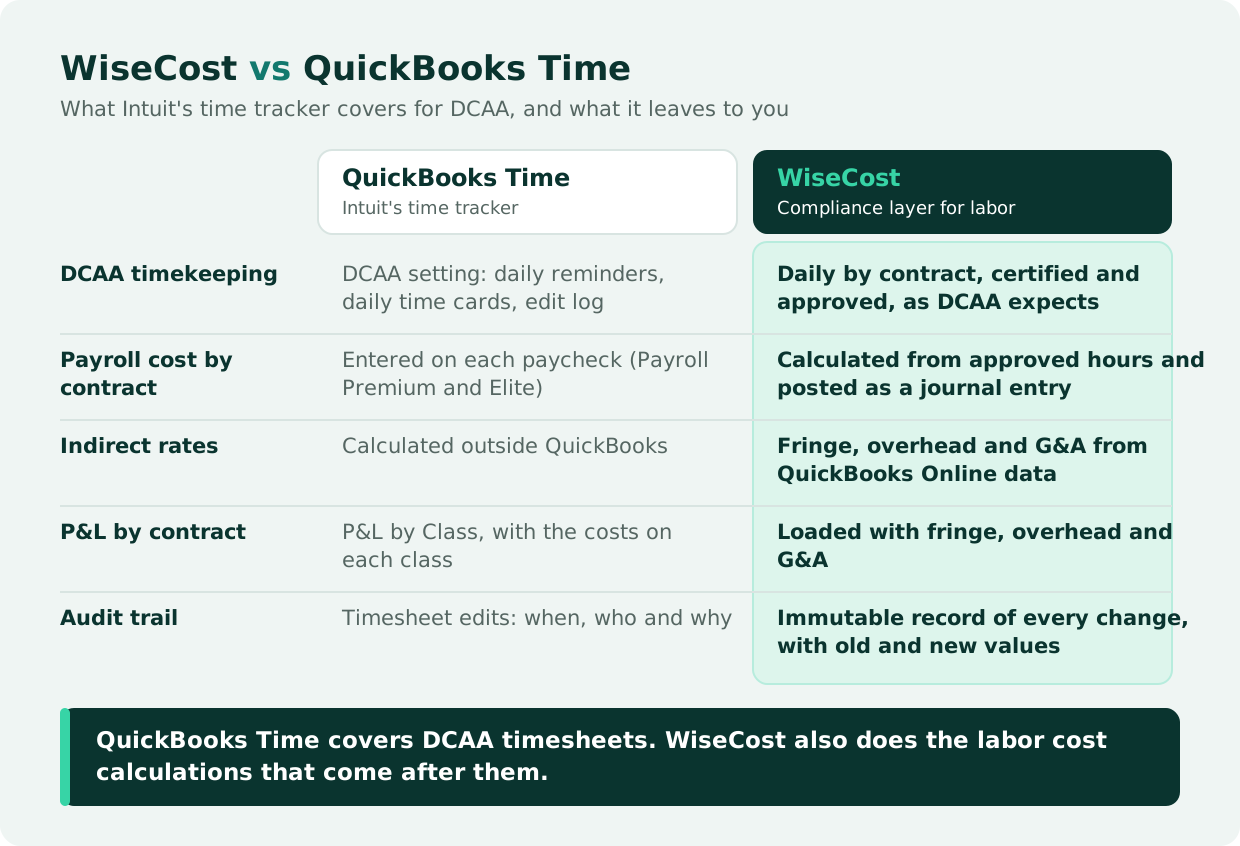
QuickBooks Time covers DCAA timesheets. The labor cost calculations after the timesheet are left to you.
What QuickBooks Time is
QuickBooks Time is Intuit's time tracking product, formerly TSheets. It requires a QuickBooks Online account. Intuit is moving its functionality inside QuickBooks Online in phases, and it is included in the QuickBooks Workforce Premium and Elite payroll plans. It can also be bought on its own as Time Premium or Time Elite. Time Elite adds project tracking, estimates vs. actuals and timesheet signatures.
What QuickBooks Time does for DCAA
When you turn on its DCAA compliance setting, QuickBooks Time adds four things:
- A DCAA compliance add-on is installed at no extra charge.
- Daily reminders ask team members to submit their timesheet at the end of each workday.
- Manual time cards. Team members enter their total hours at the end of each workday instead of clocking in and out.
- An audit trail records when timesheets were updated or edited, by whom and why.
Intuit adds three practical notes about the setting:
- Time is entered on the daily time card. Intuit says its mobile time tracking options don't capture all the information DCAA requires.
- Training is part of the setup. Each team member is responsible for tracking their own time correctly.
- The rest of the process needs its own review. Intuit recommends working with a DCAA compliance consultant on time tracking, payroll and accounting procedures.
What QuickBooks Online Payroll adds
In QuickBooks Online Payroll Premium and Elite, you can assign each paycheck to classes or projects. Here is how it works: for salaried employees you enter the percentage of time spent on each class or project, and for hourly employees you enter the hours for each one. Profit and Loss by Class then shows the payroll cost on each contract.
That is a real step toward costs by contract. Two things are still left to you. The split is entered on each paycheck, so someone has to work out each salaried employee's percentages from the approved timesheets every pay period. For DCAA, those percentages have to come from each period's approved timesheets, not from an estimate. A fixed split that no timesheet supports is hard to defend in an audit. And nothing in QuickBooks Online calculates the indirect rates that load each contract with its share of fringe, overhead and G&A. Sarah Sun, CPA, describes where the line falls:
"We can set up the correct chart of accounts in QuickBooks. So that's the fundamental part. And classes, which means to separate different projects. This is what QuickBooks can do. What QuickBooks cannot do is the labor distribution itself, the whole calculation, as well as the indirect rate calculation, and the profit and loss by contract."
Sarah Sun, CPA, Sr Manager at Wendroff & Associates, CPA
What WiseCost covers
WiseCost is a time tracking and labor cost allocation application built for QuickBooks Online. It syncs your accounts, employees, classes and projects from QuickBooks Online, covers the labor side from the timesheet to the journal entry in one system, and sends the result back to your books. QuickBooks Online stays your accounting system.
Timekeeping your team can keep up with
- Daily time by contract. Employees log hours against contracts (QuickBooks classes or projects) or internal time such as overhead and G&A. They certify the timesheet by submitting it, and an approver signs off, with a backup approver for each employee.
- Reminders that keep timesheets on time. A heads-up before a timesheet is due, reminders while it is overdue, an escalation to the approver, and a summary for admins of who is still missing.
- Time off and holidays on the same timesheet. Employees request PTO and other leave from the Time Tracker for their approver to review, and company holidays, starting from the US federal calendar, appear on each new timesheet.
- The controls DCAA looks for. You can require each person to log their full expected hours before submitting, which is what DCAA calls total time accounting, and a contract's period of performance blocks time outside its dates.
Labor cost without spreadsheets
- Labor distribution. Each payroll period, WiseCost charges what you paid each employee to the contracts and indirect activities they worked on, based on their approved hours. Nobody has to work out percentages by hand. Pay comes from the payroll register of Gusto, ADP or Paychex, imported as CSV or XLSX, or from the pay configured for each employee.
- Posting to QuickBooks Online. An admin reviews the distribution and posts it as one journal entry. Corrections to a posted period are posted as reversals, and the original stays.
- Indirect rates and contract profitability. Fringe, overhead and G&A rates tell you what each labor dollar really costs once benefits, overhead and administration are added. You need them to price proposals, set provisional billing rates on cost-type contracts and see each contract's real margin. WiseCost calculates them from your QuickBooks Online transactions, shows each contract's profit and loss loaded with those rates, and tracks hours and dollars against each contract's ceiling.
Built for audits, and for federal grants too
- One-click compliance presets. A DCAA preset and a Uniform Guidance preset set the timekeeping controls to a strict starting point: no future-dated entries, no approving your own timesheet, employee certification before approval and a different approver. The Uniform Guidance preset is for salaries charged to federal grants under 2 CFR 200.430, useful if you hold grants, such as SBIR grants, as well as contracts.
- Audit trail. An immutable record of every change to time entries, timesheets, labor distribution and compliance settings, with the old and the new value, exportable to CSV for an auditor.
- Reports you can hand to an auditor months later. Report History downloads each report exactly as it was generated, even if settings or data changed afterward. The Indirect Rate report has a by-account view that follows the layout of a DCAA incurred cost submission.
- A check on every payroll import. When you import payroll, WiseCost points out amounts worth a second look, such as a difference against configured pay, logged hours or the previous import. The checks are advisory and never change a number.
QuickBooks Time vs WiseCost: timekeeping, labor distribution and indirect rates
| QuickBooks Time with QuickBooks Online Payroll | WiseCost on QuickBooks Online | |
|---|---|---|
| What it is | Intuit's time tracker, moving inside QuickBooks Online | An add-on for QuickBooks Online that covers labor from the timesheet to your books |
| Daily timesheets that follow DCAA rules | A DCAA setting: daily reminders and a manual daily time card | Daily entry by contract; the employee certifies by submitting; an approver with a backup |
| Built-in compliance settings | A DCAA compliance add-on, installed at no extra charge | One-click DCAA and Uniform Guidance presets |
| Record of every change (audit trail) | Timesheet edits, with when, who and why | Every change from the time entry to the posted labor cost, with the old and new value; exports to CSV for an auditor |
| Splitting each paycheck across contracts (labor distribution) | Entered by hand on each paycheck: percentages for salaried employees, hours for hourly ones (Payroll Premium and Elite) | Calculated every payroll period from approved hours and pay, then posted as one journal entry that you review |
| Fringe, overhead and G&A rates: what each labor dollar really costs, used to price proposals and bill cost-type contracts | Calculated outside QuickBooks, in a spreadsheet or another tool | Calculated from your QuickBooks Online data, with an Excel workbook that traces each rate to its transactions |
| Profit and loss by contract | Profit and Loss by Class, with the costs recorded on each class | Each contract's profit and loss, including its share of fringe, overhead and G&A |
| Payroll | Included in QuickBooks Online Payroll | Not included; uses each employee's configured pay, or the imported register from Gusto, ADP or Paychex |
| Also includes | Workforce mobile app; project tracking, mileage and timesheet signatures on Elite plans; geofencing on Workforce Elite | Timesheet reminders and escalations, time off requests, company holidays, contract budgets and periods of performance, a read-only API for BI tools |
| Starting price* | Included in QuickBooks Workforce Premium and Elite. On its own: Time Premium, $20 per month plus $10 per user; Time Elite, $40 per month plus $12 per user | $149 per month including 5 users, plus $15 per month for each additional user |
*List prices as published by each vendor in October 2026, before promotions. Prices and plans change, so confirm them with each vendor before budgeting.
How the two fit together
You do not have to choose between QuickBooks Online and WiseCost: QuickBooks Online stays your accounting system either way, and WiseCost connects to it in about a minute with no data migration. The choice is which tool your team uses to record time on government work.
Payroll keeps running where it runs today. For each period, WiseCost takes each employee's pay from the payroll register you import from Gusto, ADP or Paychex, or from the pay configured for each employee, calculates labor distribution and posts the labor cost back to QuickBooks Online by contract. For the full split of who does what, see WiseCost vs QuickBooks Online.
When QuickBooks Time is enough
- Your government work is firm-fixed-price, no contract asks you to support labor charges, and you mainly need accurate hours by job.
- You already have a labor cost process that works from the timesheet data, and you are comfortable running it each pay period.
Even on fixed-price work, knowing what each contract really costs protects your margin. We cover that in Is Fixed-Price the New Default for GovCon Contracts?
When you need WiseCost
- You have, or are bidding on, cost-type, T&M or labor-hour contracts, where labor charges have to be supported from timesheet to ledger.
- Labor distribution is a spreadsheet, or percentages typed into each paycheck. See labor distribution in a spreadsheet, an add-on or an ERP.
- You need indirect rates for proposals, provisional billing or year-end. See how to calculate indirect rates in QuickBooks Online.
- You want an audit trail that covers the whole labor cycle, not only timesheet edits, for a floor check or an incurred cost audit.
FAQ
The Bottom Line
QuickBooks Time gives a small contractor DCAA-style daily timesheets with an audit trail, and QuickBooks Online Payroll can assign each paycheck to classes or projects. Turning approved hours into labor cost by contract, calculating indirect rates and loading each contract with them is left to you or your accountant. WiseCost covers those steps on the QuickBooks Online you already have, so the system is in place before your first cost-type contract or your next pre-award review.
Want to see the difference on your own data? Start a 14-day free trial connected to your QuickBooks Online, or take the free DCAA Readiness Self-Assessment to see which gaps you have first.