QuickBooks & GovCon· · 5 min read
How to Calculate Indirect Rates in QuickBooks Online (and See True Cost by Contract)
How indirect rates work (pool over a base), how to apply them per contract, and why QuickBooks Online shows gross profit but not true, fully-loaded cost.
Once your costs sit in the five cost pools, the next step is turning those pools into indirect rates and applying them to your contracts. This is the step that reveals what each contract actually costs you, and it's the step QuickBooks Online can't do on its own. Here's how the rate works, and what it does to your contract-level profit.
An Indirect Rate Is Just Division
Once costs sit in pools, an indirect rate is simple arithmetic: the pool total divided by an allocation base.
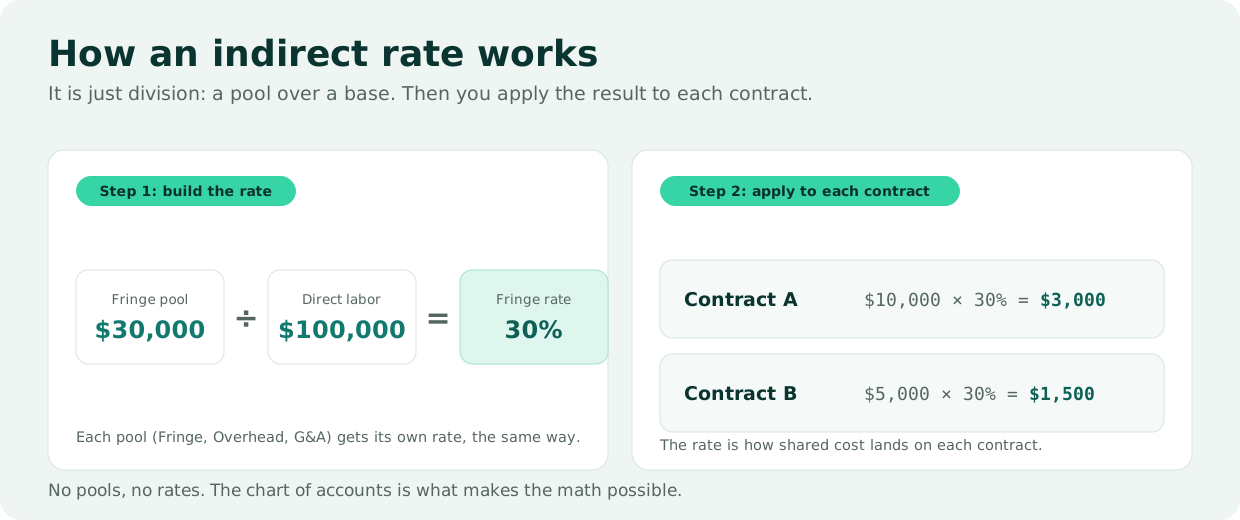
Step 1: build the rate. Take the fringe pool as an example:
| Amount | |
|---|---|
| Indirect cost pool (fringe collected) | $30,000 |
| Allocation base (total direct labor) | $100,000 |
| Fringe rate | 30% |
Step 2: apply it to each contract. The rate is how shared cost lands on each contract:
| Contract | Direct labor | Rate | Indirect applied |
|---|---|---|---|
| Contract A | $10,000 | 30% | $3,000 |
| Contract B | $5,000 | 30% | $1,500 |
Every pool (Fringe, Overhead, and G&A) gets its own rate, calculated the exact same way: pool divided by base. No pools means no rates: the chart of accounts is what makes the math possible.
Why QuickBooks Online Can't Finish the Job
Here's where small contractors hit a wall. A good chart of accounts lets you classify transactions and read your financial statements with confidence, but two steps still have to happen, and QuickBooks Online does neither. As Brian Wendroff, CPA, Co-founder of WiseCost and Managing Partner at Wendroff & Associates, CPA, puts it: "QuickBooks does not have an auditable, automatable labor distribution process, and it cannot allocate indirect cost to a contract. This is why many government contractors, as they grow, eventually transition to Deltek or Unanet, because at the core of those tools are a labor distribution process and the ability to allocate indirect cost to a contract."
That's the historical trap: the capability to allocate cost to contracts was locked inside an enterprise ERP, which for a small contractor means replacing QuickBooks entirely. For a short explainer on this gap, watch Why isn't QuickBooks enough for DCAA compliance?.
Gross Profit vs. True Cost by Contract
A standard QuickBooks profit-and-loss statement shows revenue, expenses, and a bottom line for the company. Break it out by class and you get a bit more insight per contract, but the indirect costs still sit in their own column, not yet pushed onto the contracts that caused them. That is gross profit by contract, not true cost.
Allocate the indirect costs to each contract using the rates, and the picture sharpens:
| Contract 1 | Contract 2 | Total | |
|---|---|---|---|
| Revenue | $10,000.00 | $1,875.00 | $11,875.00 |
| Direct labor | $5,238.09 | $1,190.48 | $6,428.57 |
| Indirect expenses (allocated) | $2,909.57 | $661.86 | $3,571.43 |
| Net operating income | $1,852.34 | $22.66 | $1,875.00 |
| Net margin | 18.5% | 1.2% | 15.8% |
Same total profit ($1,875) either way. But once indirect cost is allocated, Contract 1 runs a healthy 18.5% margin while Contract 2 is barely above breakeven at 1.2%. In a plain QuickBooks P&L, both contracts would have looked fine.
The indirect allocation is what tells you which contract is actually carrying the business, and which one you'd want to reprice at renewal.
This is not a hypothetical. In the short clip below, Brian walks through a real contract that looked profitable on the P&L and stopped looking that way once the indirect cost landed on it:
How the Numbers Get There: Labor Distribution
The reason those indirect columns can be filled in at all is labor distribution: converting each employee's approved hours into dollars posted across the right cost objectives. A simple example: a $100 wage split 40% to Project A (direct), 40% to Project B (direct), and 20% to G&A (indirect) posts as $40 / $40 / $20 in the general ledger.
How WiseCost Does It on Top of QuickBooks Online
Distributing labor and allocating indirect cost are the two steps QuickBooks Online cannot do on its own, and they are exactly what WiseCost adds on top of it. Employees log hours by contract and indirect category; WiseCost distributes that labor to the correct pools at each employee's actual rate, posts the journal entry back into QuickBooks Online with an immutable audit trail, and then calculates your indirect rates from the period's costs and allocates them across contracts. The result is the fully-loaded, profit-by-contract view above, produced as a byproduct of staying compliant, without migrating off QuickBooks Online or paying for an ERP.
Get the free 147-account chart of accounts template. It is CPA-reviewed and built for GovCon books: the pool structure that makes these indirect rates possible, with all 147 accounts pre-mapped and ready to import into QuickBooks Online.
You can also run our free DCAA Readiness Self-Assessment to check whether your books can produce compliant indirect rates, or book a demo to watch WiseCost turn your QuickBooks Online data into profit by contract.