DCAA Compliance Software· · 10 min read
WiseCost vs QuickBooks Online: Do You Need Both?
QuickBooks Online keeps your books. WiseCost adds the timekeeping, labor distribution, indirect rates and audit trail DCAA reviews. Here is how the two work together.
This guide is for small government contractors who keep their books in QuickBooks Online and are working toward an accounting system that holds up to DCAA. Some are setting it up before their first cost-type or T&M contract, some are getting ready for a pre-award accounting system review, and some already bill the government for labor. The question we hear from all three is whether WiseCost replaces QuickBooks. It does not. The two are complementary, and once you see where one ends and the other begins, the decision gets much simpler.
The short answer
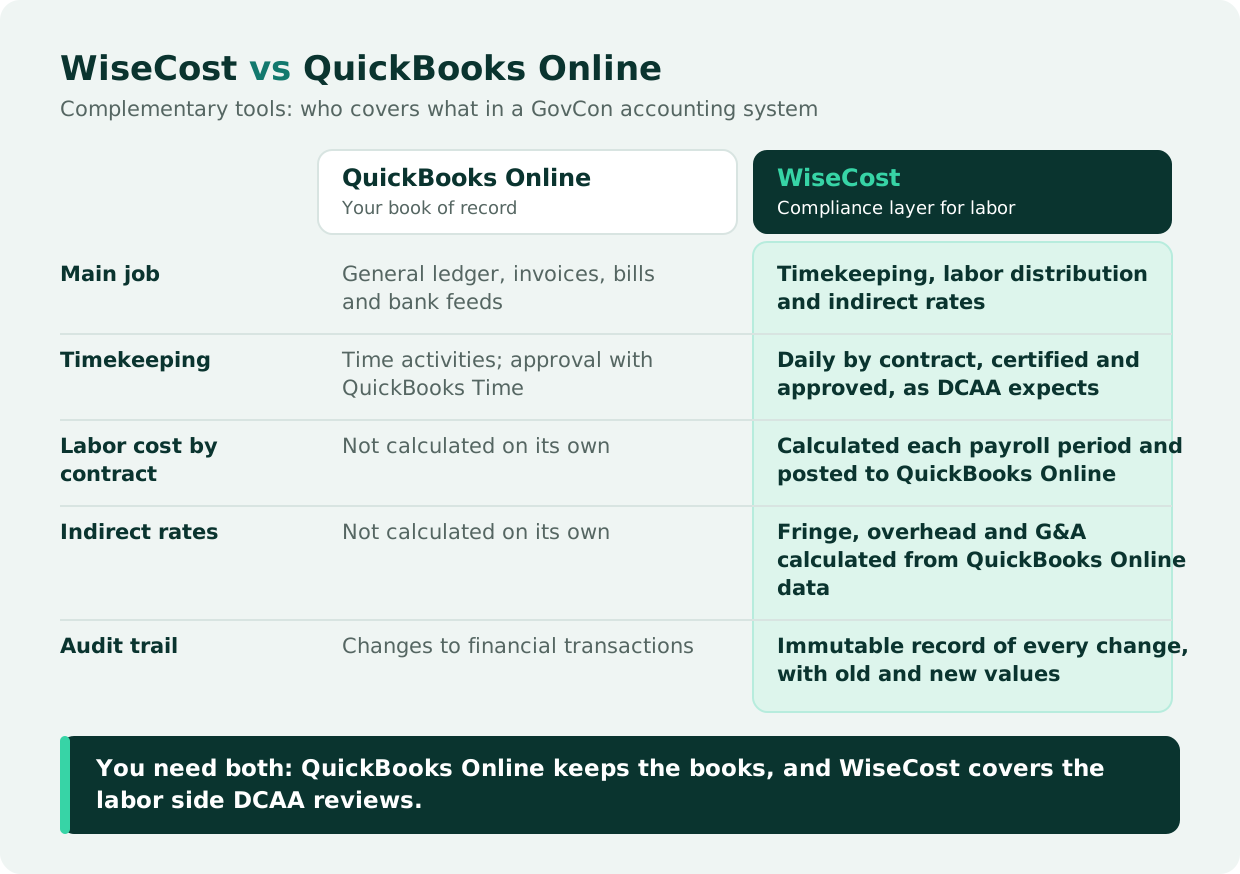
Yes, if your contracts require you to support labor charges, you need both. WiseCost is a QuickBooks Online add-on for DCAA timekeeping and labor distribution. QuickBooks Online stays your accounting system: general ledger, chart of accounts, contracts as classes or projects, bills, invoices and bank feeds. WiseCost works as a compliance layer on top of it and covers the labor side QuickBooks Online was not built for: daily timekeeping by contract, labor distribution, indirect rates and an audit trail. The two connect directly, with no migration, and WiseCost sends the labor cost back to QuickBooks Online as a journal entry, so your books stay in one place.
QuickBooks Online and WiseCost are complementary: each one covers a different part of the system.
What QuickBooks Online does on its own
QuickBooks Online is a double-entry general ledger that reports on an accrual or cash basis. Set up for government contracting, its chart of accounts separates direct costs, indirect cost pools and unallowable costs, and class tracking (or projects) gives each contract its own column on the profit and loss. None of that needs an add-on. Our guides QuickBooks Online for Government Contractors and How to Make QuickBooks Online DCAA-Compliant walk through the setup.
Labor is where it falls short. QuickBooks Online records each payroll, and QuickBooks Time, included in some QuickBooks Online Payroll plans, lets employees track hours and managers approve them. What neither does is split each employee's pay across the contracts they worked on based on those approved hours. They also do not calculate indirect rates or apply them to each contract. Sarah Sun, CPA, describes where the line falls:
"We can set up the correct chart of accounts in QuickBooks. So that's the fundamental part. And classes, which means to separate different projects. This is what QuickBooks can do. What QuickBooks cannot do is the labor distribution itself, the whole calculation, as well as the indirect rate calculation, and the profit and loss by contract."
Sarah Sun, CPA, Sr Manager at Wendroff & Associates, CPA
Jordan Glaze sees the same pattern among the firm's government contractor clients:
"What works well for [our clients] is QuickBooks is a good starting place for businesses as they're growing. And what's not working with them is the payroll allocation. So properly allocating and distributing payroll is usually the biggest issue for clients when they need to be DCAA compliant."
Jordan Glaze, Business Development Specialist/Accountant, Wendroff & Associates, CPA
What WiseCost adds
A compliance layer is a tool that sits on top of your accounting system instead of replacing it. WiseCost is one: a time tracking and labor cost allocation application built for QuickBooks Online, with no ledger of its own. Some QuickBooks add-ons for DCAA cover timekeeping only. WiseCost goes from the timesheet to the journal entry, which on the SF-1408, the checklist DCAA uses to evaluate a contractor's accounting system, covers timekeeping, labor distribution and indirect cost allocation.
Its core is labor distribution. Each payroll period, WiseCost charges what you paid each employee to the contracts and indirect activities they worked on, based on their approved hours, and posts the result to QuickBooks Online as one journal entry. Our labor distribution guide walks through the calculation step by step. The table below covers the rest: approvals, indirect rates, contract reports and the audit trail.
Who does what
| Task | QuickBooks Online | WiseCost |
|---|---|---|
| General ledger and financial statements | Your book of record | Reads accounts and transactions from it and posts labor journal entries to it |
| Chart of accounts and cost pools | Accounts are created and kept here | Reads each account from QuickBooks Online and assigns it a role (direct, fringe, overhead, G&A, unallowable) for the rate calculation |
| Contracts | Set up as classes or projects | Syncs them from QuickBooks Online; employees charge time to them |
| Bills, invoices, bank reconciliation | Yes | No |
| Payroll processing | QuickBooks Payroll or your payroll provider | No; imports the payroll register to cost labor |
| Daily timekeeping with approval | Records time activities; QuickBooks Time, included in some Payroll plans, adds approval | Daily entries by contract, as DCAA expects: the employee certifies the timesheet by submitting it, an approver signs off, and the approved hours flow directly into labor distribution |
| Labor distribution to contracts and pools | Not calculated on its own; receives the journal entry | Calculates it from approved hours and pay, and posts the journal entry once an admin reviews it |
| Fringe, overhead and G&A rates | Not calculated on its own; records the costs in each pool account | Calculates each rate from those QuickBooks Online transactions |
| Profit and loss by contract | Revenue and the costs recorded on each class or project | Adds each contract's share of indirect costs |
| Audit trail | Audit log of changes to financial transactions | Immutable record of every change to time entries, timesheets, labor distribution and compliance settings: who changed what, when, and the old and new value. Nothing can be edited or deleted, and it exports to CSV for an auditor |
How data moves between the two
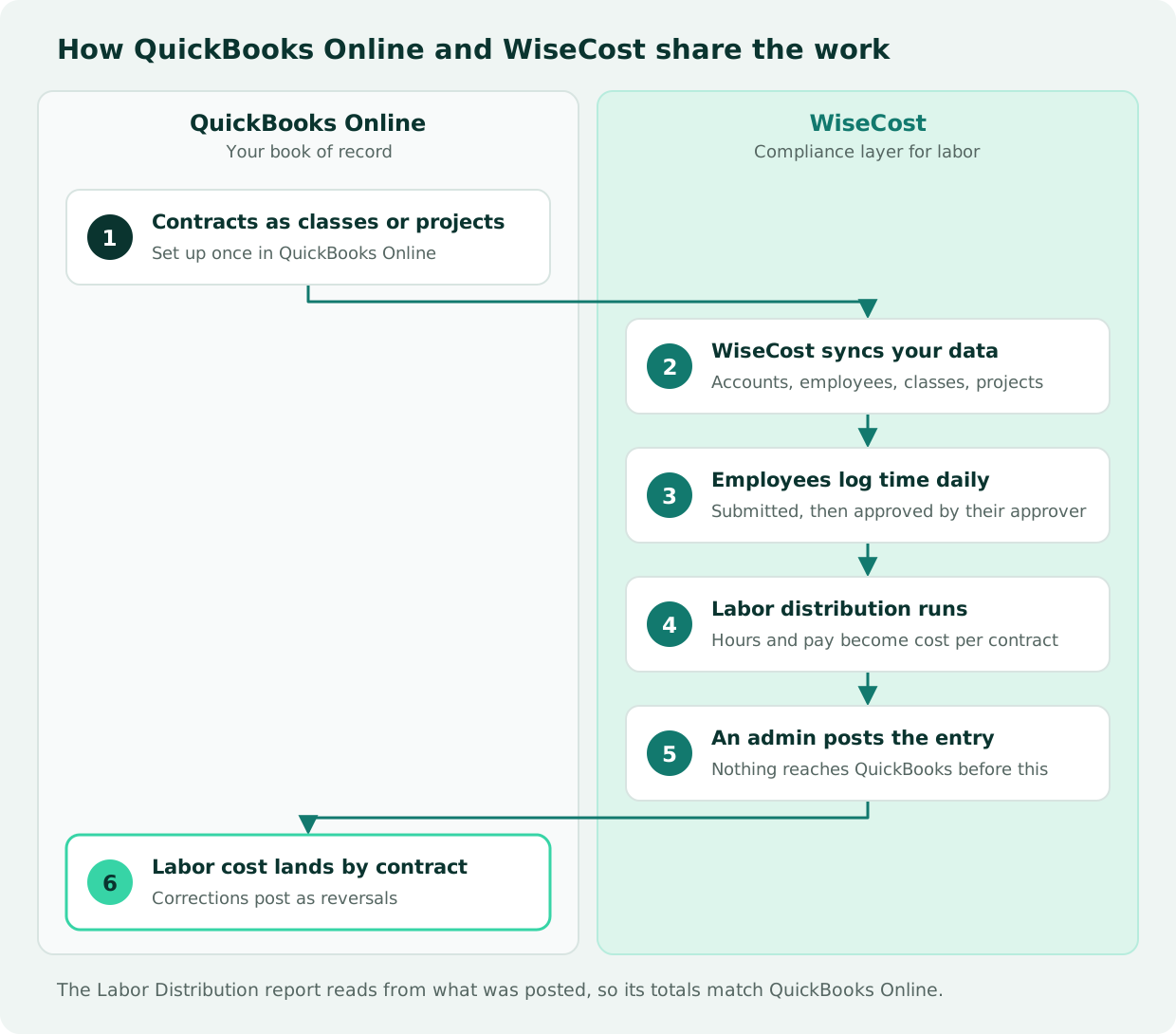
- You set up contracts in QuickBooks Online as classes or projects.
- WiseCost syncs your accounts, employees, classes and projects.
- Employees log time daily in WiseCost, submit their timesheets, and approvers approve them.
- At the end of the payroll period, you run labor distribution with the period's pay, imported from Gusto, ADP or Paychex or taken from each employee's configured pay.
- An admin reviews the distribution and clicks Post Journal Entry. Nothing reaches QuickBooks Online before that.
- The labor cost lands on each contract in QuickBooks Online. If a posted period has to be corrected, WiseCost posts a reversal entry and keeps the original.
The order matters for audit purposes: hours are approved before they become costs, and costs reach the ledger through a journal entry you can trace back to the timesheets.
This is what the contract view looks like inside QuickBooks Online once costs are posted by class:
What stays the same when you add WiseCost
Adding WiseCost changes how employees record time and how labor reaches the books. Everything else stays where it is: your bookkeeper and CPA keep working in QuickBooks Online, invoicing and bill pay don't move, and the apps you already connect to QuickBooks Online keep working. Brian Wendroff, CPA, counts that ecosystem among QuickBooks Online's real strengths:
"QuickBooks Online has a superiority of what it can do. It's very flexible. It can integrate. It can go integrate into Zapier. There's a lot of import features. It connects to payment processors. It has its own marketplace with probably over a thousand vendors."
Brian Wendroff, CPA, Co-founder of WiseCost and Managing Partner at Wendroff & Associates, CPA
When you need a compliance layer, and when to look at an ERP
QuickBooks Online on its own can keep your books while your government work is firm-fixed-price and no contract asks you to support labor charges. Even then, you need to know what each contract really costs to protect your margin, and without labor by contract that number is incomplete. See Is Fixed-Price the New Default for GovCon Contracts?. The compliance pressure starts with cost-type, T&M and labor-hour contracts, where the government pays for your people's time and expects you to show where it went. For how contract type changes what you need, see Cost-Reimbursable vs. T&M vs. Firm Fixed Price.
QuickBooks Online with a compliance layer covers what the SF-1408 tests for most small contractors, and it can be set up before the first cost-type award, so the system is in place when the review comes.
An ERP starts to make sense once you need earned value analysis, integrated government-format billing or procurement, or Cost Accounting Standards apply to your contracts. Size matters too: our guide QuickBooks Online for Government Contractors places the usual turning point at roughly $10 to $20 million in revenue, when an in-house accounting team becomes affordable. Two comparisons go deeper: Is Unanet Overkill for a Small GovCon? and WiseCost vs Deltek Costpoint.
Getting started with WiseCost
WiseCost connects to the QuickBooks Online company you already have, with no data migration. The connection takes about a minute, only reads your data, and keeps WiseCost in sync with QuickBooks Online from then on.
Pricing is $149 per month including 5 users, plus $15 per month for each additional user, on top of your QuickBooks Online subscription.
The software provides the controls. An auditor still evaluates the system as a whole: your written timekeeping policy, whether your team follows it, and how your CPA reviews the books.
FAQ
The Bottom Line
For a government contractor getting DCAA ready, QuickBooks Online and WiseCost are complementary. QuickBooks Online keeps the books. WiseCost records, approves and distributes labor, then sends the result back to QuickBooks Online as a journal entry. If your books already work in QuickBooks Online and the gap is on the labor side, a compliance layer closes it without replacing the system, whether you are preparing for your first cost-type contract or a pre-award review.
Want to see how it works with your own data? Start a 14-day free trial connected to your QuickBooks Online, or take the free DCAA Readiness Self-Assessment to see which gaps you have first.