DCAA Compliance Software· · 14 min read
WiseCost vs Hour Timesheet: DCAA Timekeeping or the Full Labor Cost Cycle?
Hour Timesheet is a DCAA timekeeping tool that syncs with QuickBooks. WiseCost adds labor distribution, indirect rates and profit and loss by contract on QuickBooks Online. Here is what each one covers and how to choose.
This guide is for small government contractors who keep their books in QuickBooks and are comparing DCAA timekeeping tools. Hour Timesheet comes up in almost every one of those searches, and for good reason: it is built for government contractors and starts at a low price per user. The question worth asking before you compare prices is how much of the DCAA labor cycle you need the tool to cover. Timekeeping is where that cycle starts. Labor distribution, indirect rates and costs by contract come after it, and someone has to do them every pay period.
The short answer
Hour Timesheet is a DCAA timekeeping application. Employees record time daily, supervisors approve it, every edit is logged, and approved hours sync to QuickBooks Online or QuickBooks Desktop. Its payroll plan adds payroll processing and labor-distribution reporting to the general ledger, the core of your books where every transaction is recorded.
WiseCost is a QuickBooks Online add-on for DCAA timekeeping and labor distribution. Employees record time daily by contract, certify their timesheets and get them approved, with an audit trail of every change. Then, each payroll period, WiseCost turns approved hours and pay into labor cost by contract, posts it to QuickBooks Online as a journal entry (the accounting entry that records that cost in your books), calculates fringe, overhead and G&A rates from your QuickBooks Online data, and produces a profit and loss by contract loaded with those rates.
If you mainly need compliant timesheets and already have a labor cost process that works, a timekeeping tool can be enough. If labor distribution and indirect rates are still built by hand in spreadsheets, or not done yet, WiseCost calculates them in the same system.
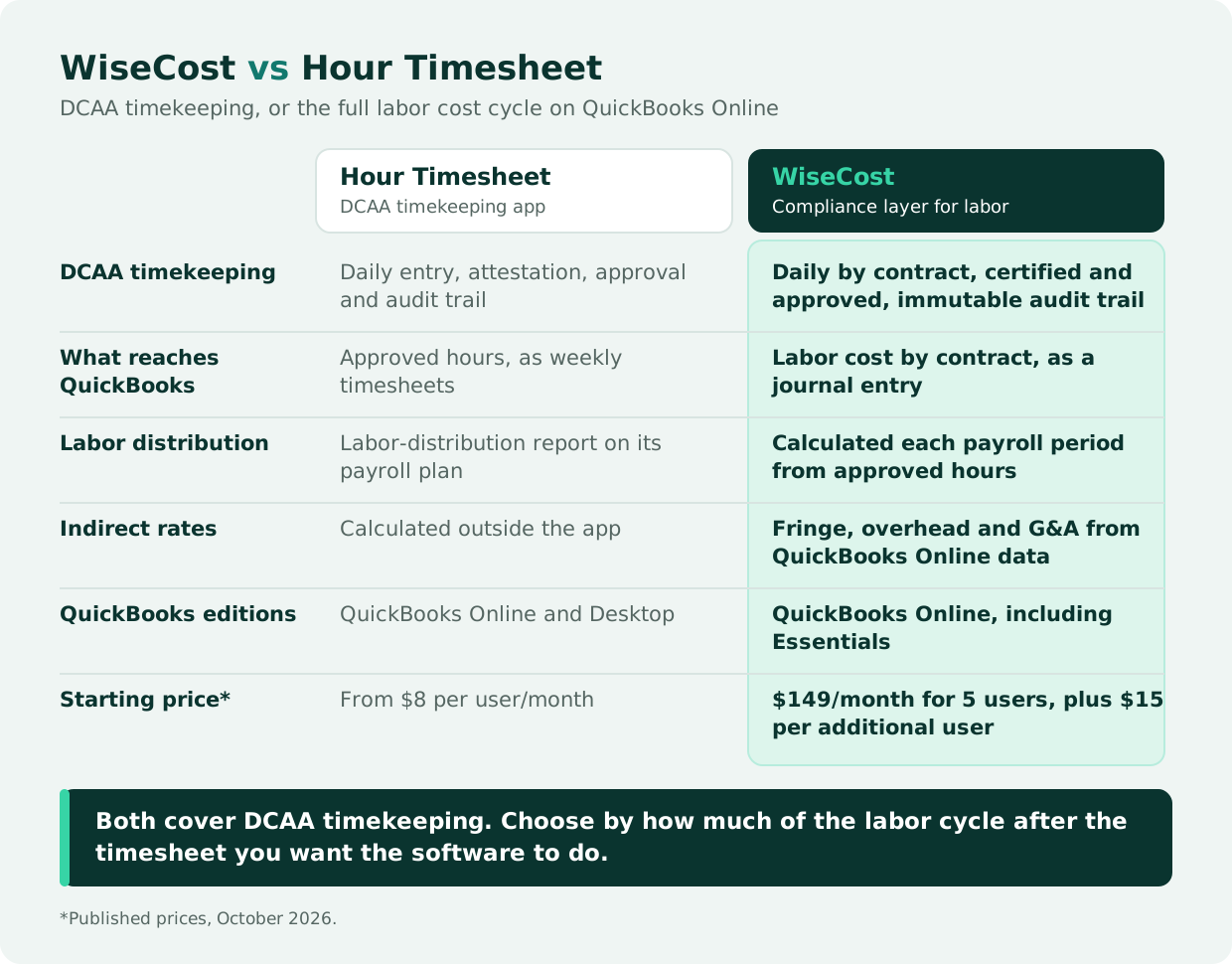
Both tools cover DCAA timekeeping. The difference is what happens after the timesheet is approved.
Why timekeeping is only the first step
DCAA looks at timekeeping closely, and for a good reason: it is the source of every labor dollar you charge the government. The SF-1408, the Preaward Survey of Prospective Contractor Accounting System that DCAA uses to evaluate a contractor's accounting system, asks for more than timesheets, though. It also asks whether your system has a labor distribution that reconciles to payroll and the general ledger, and whether it can allocate indirect costs to contracts.
Put in order, the labor side of a GovCon accounting system has four steps:
- Timekeeping. Each employee records hours daily by contract or indirect activity, certifies the timesheet, and a supervisor approves it. Our guide to the DCAA timekeeping requirements auditors check covers each control.
- Labor distribution. Each payroll period, what you paid each employee is split across the contracts and indirect activities they worked on, based on their approved hours. See labor distribution for government contractors.
- Posting to the ledger. That distribution reaches the general ledger as a journal entry, so labor cost by contract in your books matches the timesheets.
- Indirect rates and costs by contract. Fringe, overhead and G&A are calculated from the ledger and applied to each contract, which gives you its fully loaded cost. See how to calculate indirect rates in QuickBooks Online.
A timekeeping tool covers step 1 and sends the hours to your accounting system. Some go further: Hour Timesheet's payroll plan adds labor-distribution reporting, and its job costing reports show hours and pay by job. Whatever a tool leaves out of steps 2 to 4 still has to happen every pay period, in a spreadsheet or in software. Sarah Sun, CPA, describes what QuickBooks does and doesn't do on that side:
"We can set up the correct chart of accounts in QuickBooks. So that's the fundamental part. And classes, which means to separate different projects. This is what QuickBooks can do. What QuickBooks cannot do is the labor distribution itself, the whole calculation, as well as the indirect rate calculation, and the profit and loss by contract."
Sarah Sun, CPA, Sr Manager at Wendroff & Associates, CPA
What Hour Timesheet covers
As described on Hour Timesheet's website in October 2026:
- DCAA timekeeping. Daily time entry with attestation, daily reminders, a supervisor approval workflow with escalation, and an immutable audit trail that captures who changed an entry, when and why. It also enforces segregation of duties through role permissions and provides timekeeping system documentation for auditors.
- QuickBooks integration. A bi-directional sync with QuickBooks Online and QuickBooks Desktop. Employees, customers, jobs, service items and classes come from QuickBooks, and approved timesheets export back to QuickBooks as weekly timesheet entries, organized by employee, customer or job, and service item. Once a timesheet is exported, changes go through a correction timesheet.
- Job costing. Bill rates and pay rates by employee job code for job costing reports, and contract, task and cost-code tracking.
- Leave, expenses and mobile. Leave balances and accruals on the timesheet, expense tracking, and iOS and Android apps.
- Payroll. Its With Payroll plan runs payroll through embedded Gusto and adds labor-distribution reporting to the general ledger. Approved timesheets can also be exported to ADP or Paychex.
Its published features center on time, leave, expenses, job costing and payroll. Fringe, overhead and G&A rates, and a profit and loss by contract that includes them, are calculated outside the app, in a spreadsheet or another tool.
What WiseCost covers
WiseCost is a time tracking and labor cost allocation application built for QuickBooks Online. It syncs your accounts, employees, classes and projects from QuickBooks Online, covers the four steps above in one system, and sends the result back to your books. QuickBooks Online stays your accounting system.
Timekeeping your team can keep up with
- Daily time by contract. Employees log hours against contracts (QuickBooks classes or projects) or internal time such as overhead and G&A. They certify the timesheet by submitting it, and an approver signs off, with a backup approver for each employee.
- Reminders that keep timesheets on time. A heads-up before a timesheet is due, reminders while it is overdue, an escalation to the approver, and a summary for admins of who is still missing.
- Time off and holidays on the same timesheet. Employees request PTO and other leave from the Time Tracker for their approver to review, and company holidays, starting from the US federal calendar, appear on each new timesheet.
- The controls DCAA looks for. A DCAA preset sets strict controls as the starting point. You can require each person to log their full expected hours before submitting, which is what DCAA calls total time accounting, and a contract's period of performance blocks time outside its dates.
Labor cost without spreadsheets
- Labor distribution. Each payroll period, WiseCost charges what you paid each employee to the contracts and indirect activities they worked on, based on their approved hours. Pay comes from the payroll register of Gusto, ADP or Paychex, imported as CSV or XLSX, or from the pay configured for each employee, and employer taxes and benefits can be distributed as separate lines.
- Posting to QuickBooks Online. An admin reviews the distribution and posts it as one journal entry. If a posted period has to be corrected, WiseCost posts a reversal and keeps the original.
- Indirect rates and contract profitability. Fringe, overhead and G&A rates tell you what each labor dollar really costs once benefits, overhead and administration are added. You need them to price proposals, set provisional billing rates on cost-type contracts and see each contract's real margin. The Indirect Rate report calculates them from your QuickBooks Online transactions and downloads as an Excel workbook with live formulas. The P&L report shows each contract's profit and loss loaded with those rates, and Budget vs Actual by Contract tracks hours and dollars against each contract's ceiling.
Built for audits, and for federal grants too
- One-click compliance presets. A DCAA preset and a Uniform Guidance preset set the timekeeping controls to a strict starting point: no future-dated entries, no approving your own timesheet, employee certification before approval and a different approver. The Uniform Guidance preset is for salaries charged to federal grants under 2 CFR 200.430, useful if you hold grants, such as SBIR grants, as well as contracts.
- Audit trail. An immutable record of every change to time entries, timesheets, labor distribution and compliance settings, with the old and the new value, exportable to CSV for an auditor.
- Reports you can hand to an auditor months later. Report History downloads each report exactly as it was generated, even if settings or data changed afterward. The Indirect Rate report has a by-account view that follows the layout of a DCAA incurred cost submission.
- A check on every payroll import. When you import payroll, WiseCost points out amounts worth a second look, such as a difference against configured pay, logged hours or the previous import. The checks are advisory and never change a number.
WiseCost works with QuickBooks Online only, including QuickBooks Online Essentials. It does not process payroll and does not track expenses.
Hour Timesheet vs WiseCost: timekeeping, labor distribution and indirect rates
| Hour Timesheet | WiseCost | |
|---|---|---|
| What it is | An app for DCAA timesheets that connects to QuickBooks | An add-on for QuickBooks Online that covers labor from the timesheet to your books |
| Daily timesheets that follow DCAA rules | Yes: daily entry, employee attestation and supervisor approval | Yes: daily entry by contract, employee certification, and an approver with a backup |
| Record of every change (audit trail) | Every timesheet edit, with who, when and why | Every change from the time entry to the posted labor cost, with the old and new value; exports to CSV for an auditor |
| What lands in your QuickBooks books | Approved hours, as weekly timesheets | The labor cost of each contract, as one journal entry that you review before it posts |
| Splitting each paycheck across contracts (labor distribution) | A labor-distribution report on the With Payroll plan, which runs payroll through Gusto | Calculated every payroll period from approved hours and pay |
| Fringe, overhead and G&A rates: what each labor dollar really costs, used to price proposals and bill cost-type contracts | Calculated outside the app, in a spreadsheet or another tool | Calculated from your QuickBooks Online data, with an Excel workbook that traces each rate to its transactions |
| Profit and loss by contract | Job costing reports by job code | Each contract's profit and loss, including its share of fringe, overhead and G&A |
| Payroll | Built in on the With Payroll plan; export to ADP or Paychex | Not included; uses your pay data from Gusto, ADP or Paychex |
| Built-in compliance settings | Built for DCAA requirements; segregation of duties by role | One-click DCAA and Uniform Guidance presets |
| QuickBooks versions | QuickBooks Online and QuickBooks Desktop | QuickBooks Online, including Essentials |
| Also includes | Expense tracking, leave balances, iOS and Android apps | Timesheet reminders and escalations, time off requests, company holidays, contract budgets and periods of performance, a read-only API for BI tools |
| Starting price* | Basic: $8 per user per month. With Payroll: $14 per user per month plus a $40 monthly base fee | $149 per month including 5 users, plus $15 per month for each additional user |
*Prices as published by each vendor in October 2026. Prices and plans change, so confirm them with each vendor before budgeting.
The two prices pay for different scopes. A per-user timekeeping price covers the timesheet. WiseCost's price covers the timesheet plus the labor distribution, the journal entry and the indirect rate calculation, which otherwise are rebuilt by hand every pay period and every time you price a proposal.
When a timekeeping tool is enough
- You already have a labor cost process that works, built from the hours your timekeeping tool exports, and you only need compliant timesheets feeding it.
- You use QuickBooks Desktop. Hour Timesheet supports it; WiseCost works only with QuickBooks Online.
- You want payroll, expenses and timekeeping in one place, and your labor-cost needs stop at job costing reports.
- Your contracts are all firm-fixed-price and no contract asks you to support labor charges, although you still need costs by contract to protect your margin, as we cover in Is Fixed-Price the New Default for GovCon Contracts?
When you need the full labor cost cycle
- Labor distribution is a spreadsheet today. Spreadsheets work at a few employees and get harder to defend as headcount and contracts grow. Our comparison of labor distribution in a spreadsheet, an add-on or an ERP shows where each one breaks.
- You are preparing for a cost-type or T&M contract, or a pre-award accounting system review, and need labor distribution and indirect allocation working, not only timekeeping.
- You need current indirect rates to price proposals, set provisional billing rates or check them at year end. See provisional billing rates vs. final rates.
- You want to know which contracts make money, with each contract's share of fringe, overhead and G&A included.
The risk of keeping those steps manual is the one Sarah Sun, CPA, sees most often:
"Human error in that case, because if you're dealing with a lot of spreadsheets, definitely there will be human error. Maybe you forget to update one formula or things like that. But let's say if we have software that we could do automatically, automation, it is just going to avoid or reduce those human errors."
Sarah Sun, CPA, Sr Manager at Wendroff & Associates, CPA
Either tool can be part of a system DCAA finds adequate. The question is how many of the four steps the software does for you, and how many stay manual.
Questions to ask any DCAA timekeeping vendor
Ask every vendor the same questions, so the answers are comparable. Here is how WiseCost answers each one.
| Ask the vendor | How WiseCost answers |
|---|---|
| What reaches my books: hours, or labor cost by contract? | Labor cost by contract and indirect activity, as one journal entry in QuickBooks Online. An admin reviews it before it posts. |
| Who calculates labor distribution each pay period, and how does it reconcile to payroll? | WiseCost calculates it from approved hours and each period's pay, imported from Gusto, ADP or Paychex or taken from each employee's configured pay, so each person's distributed total equals their pay. |
| Does it calculate fringe, overhead and G&A, and can I trace each rate to its transactions? | Yes. The Indirect Rate report calculates them from your QuickBooks Online data and downloads as an Excel workbook with live formulas and the transactions behind each rate. |
| How are corrections handled after a timesheet is approved or a period is posted? | A rejected or reopened timesheet goes back to the employee to fix and resubmit. A posted period that is reopened gets a reversal entry, and the original stays in the books. |
| Can I export the audit trail for an auditor, with old and new values? | Yes. Every change to time entries, timesheets, labor distribution and compliance settings is recorded with the old and new value, and nobody can edit or delete it. It exports to CSV. |
| Which QuickBooks editions does it support? | QuickBooks Online, including Essentials. WiseCost does not work with QuickBooks Desktop. |
FAQ
The Bottom Line
Hour Timesheet and WiseCost both give small contractors DCAA timekeeping on QuickBooks. Hour Timesheet centers on the approved timesheet and sends hours to QuickBooks; its payroll plan adds payroll and labor-distribution reporting. WiseCost takes the timesheet all the way to labor cost by contract in QuickBooks Online, with indirect rates and a loaded profit and loss by contract. If you already have a process for that work, a timekeeping tool may be all you need. If it lives in spreadsheets, a compliance layer on QuickBooks Online covers it in one system, before your first cost-type contract or your next pre-award review.
See the full labor cycle on your own data. Start a 14-day free trial connected to your QuickBooks Online, or take the free DCAA Readiness Self-Assessment to see which gaps you have first.
Sources
- Hour Timesheet pricing
- Hour Timesheet features
- Hour Timesheet product features (job costing, leave accruals, payroll integrations)
- Hour Timesheet QuickBooks Desktop integration
- Hour Timesheet embedded payroll by Gusto
- Hour Timesheet QuickBooks Online integration
- Hour Timesheet: exporting timesheet data to QuickBooks Online
- SF-1408, Preaward Survey of Prospective Contractor Accounting System (GSA)