QuickBooks & GovCon· · 11 min read
From Payroll to Job Cost: How Payroll Becomes Labor Charged to Each Contract in QuickBooks Online
Payroll tells you what each person was paid. Job cost tells you what each contract cost. Here is the path between them for a small government contractor on QuickBooks Online: approved hours, the payroll register, labor distribution, the journal entry and the reconciliation DCAA checks.
Payroll answers one question: what did we pay each person this period? A government contractor also has to answer a second one: what did each contract cost? This guide is for owners and bookkeepers of small contractors on QuickBooks Online who run payroll in Gusto, ADP, Paychex, QuickBooks Payroll or another provider, and now need labor cost by contract, usually because a cost-type, T&M or labor-hour contract is coming, or because they want to know which contracts actually make money.
From payroll to job cost: the series
- 1From Payroll to Job Cost (you are here): how payroll becomes labor charged to each contract
- 2Employer Payroll Taxes and Fringe Costs: what follows the labor dollar and what goes to the fringe pool
- 3Salaried Employees, Total Time Accounting and Uncompensated Overtime: how to spread a salary over all hours worked
- 4Labor Distribution with Gusto, ADP or Paychex: what to export from each provider and how to map it
- 5Timesheet and Labor Corrections DCAA Will Accept: who approves a change, how it is documented, and how the labor cost follows it
The short answer
Payroll becomes job cost through labor distribution: each payroll period, you take each employee's approved hours by contract and indirect activity, take what they were paid for that period from the payroll register, and charge the pay to each contract or activity in proportion to the hours. The result is posted to QuickBooks Online as a journal entry, by class or project, so your profit and loss shows labor cost by contract.
For DCAA, three things make that process hold up. The hours come from timesheets the employee recorded and a supervisor approved. The dollars come from actual payroll. And the total charged for each employee equals what payroll paid them, to the cent, and ties to the general ledger.
Payroll records what you paid. Labor distribution records what each contract cost, and the two have to agree.
Why payroll alone does not give you job cost
A payroll run in Gusto, ADP, Paychex, QuickBooks Payroll or any other provider produces gross pay, taxes, deductions and net pay per employee. When it syncs to QuickBooks Online, the wages land in a wages account, often as one amount for the run or one per department. Nothing in that entry says which contract the hours went to.
Some payroll products can split pay by job, but not in the way DCAA reviews it:
- QuickBooks Online Payroll Premium and Elite let you assign each paycheck to classes or projects: a percentage for salaried employees, hours for hourly ones. For salaried employees, someone still has to work out the percentages from the timesheets every period.
- Gusto's labor cost allocation report applies a percentage rule to each worker's pay. Gusto describes it as "a simple percentage rule. No time tracking required." Gusto also says those percentages stay in the report and do not split an employee's wages across QuickBooks Online classes.
A fixed percentage that no timesheet supports is an estimate. DCAA expects labor charged to a contract to follow the time the employee actually recorded. Jordan Glaze sees the same gap in practice:
"The biggest thing that I see is that they believe that they're doing the allocation of payroll, but the distribution is not using the correct formula in order to get the correct distribution. So, they will just distribute payroll from the total. It's a lot more complicated than that."
Jordan Glaze, Business Development Specialist/Accountant, Wendroff & Associates, CPA
What DCAA expects from this process
DCAA's guide for contractors, Information for Contractors (DCAA Manual 7641.90), lists what an adequate accounting system needs. Four items describe the path from payroll to job cost:
- A timekeeping system that identifies employees' labor by intermediate or final cost objectives. Every hour is recorded against a contract or an indirect activity.
- A labor distribution system that charges direct and indirect labor to the appropriate cost objectives. The hours become dollars on each contract and each indirect pool.
- Accumulation of costs under general ledger control. The job cost detail can be reconciled to the general ledger.
- Interim (at least monthly) determination of costs charged to a contract. Labor cost by contract is posted regularly, not rebuilt at year-end.
The same items appear on the SF-1408, the checklist DCAA uses in a pre-award accounting system review. In a floor check, DCAA's audit program also asks whether hours on timesheets are reconciled periodically with hours in attendance and payroll records.
The path, step by step
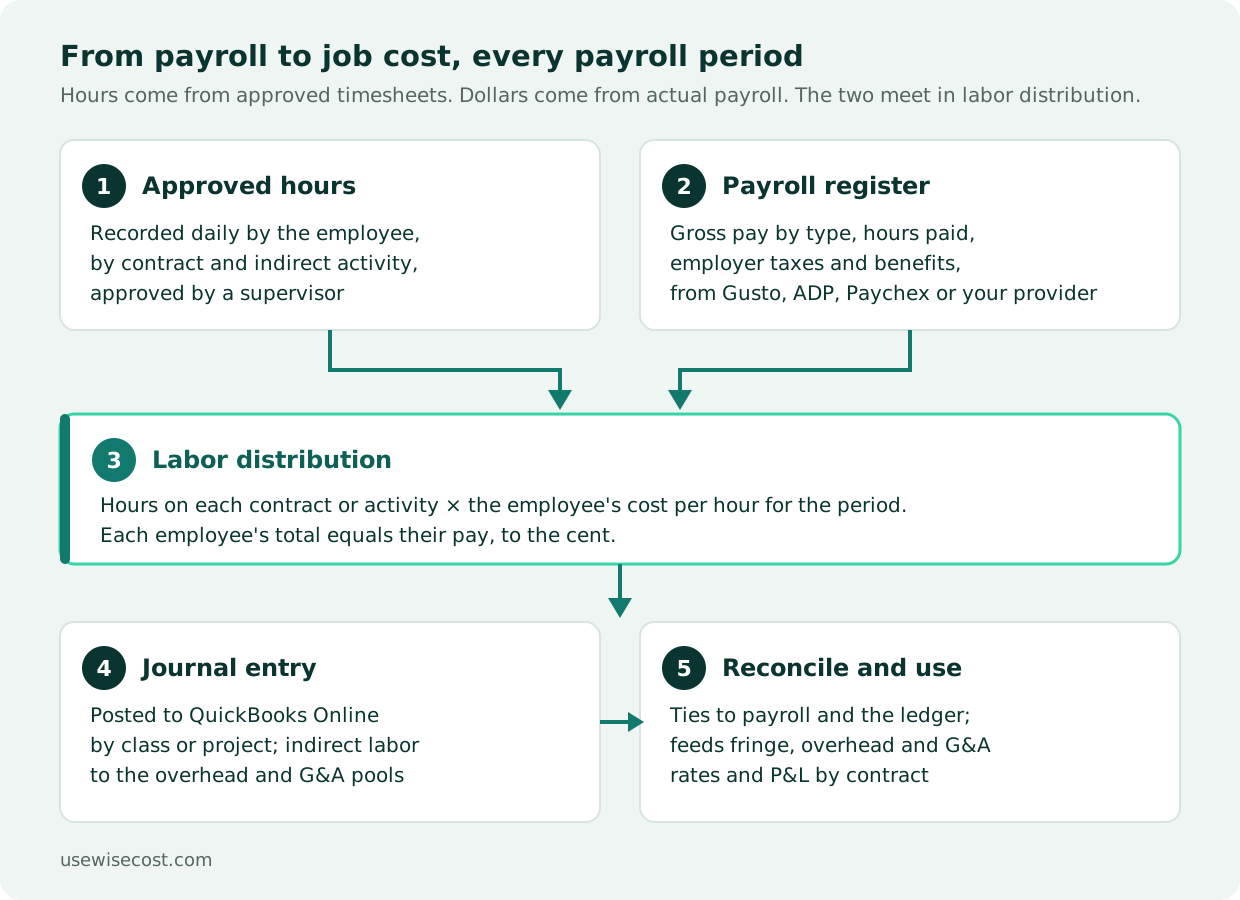
- Approve the period's timesheets. Each employee records time daily against contracts and indirect activities (overhead, G&A, bid and proposal, PTO, holiday). A supervisor who knows the work approves it. See DCAA timekeeping requirements.
- Pull the payroll register for the same period. For each employee: gross pay split by type (regular, overtime, PTO, holiday, bonus), hours paid, employer taxes and employer benefit contributions. See what to export from Gusto, ADP or Paychex.
- Work out each employee's cost per hour for the period. Hourly employees: their pay for the period over the hours paid. Salaried employees: the salary for the period over all hours recorded, which is why total time accounting matters.
- Charge each contract and activity its share. Hours on each line times the cost per hour. Round to the cent and put the rounding difference on one line, so each employee's total equals their pay exactly.
- Decide where employer taxes and benefits go. They usually stay in the fringe pool and reach contracts through the fringe rate. See employer payroll taxes and fringe costs.
- Post one journal entry to QuickBooks Online. Debit labor accounts by contract (class or project) and indirect labor accounts by pool; credit the account where payroll recorded the gross wages, so the cost is moved, not counted twice.
- Reconcile and keep the records. Labor distribution ties to the payroll register and to the general ledger. If something is wrong after posting, reverse the entry and post the correction, so the original stays on record. Deleting a posted entry is for posting errors only, such as an entry posted to the wrong period, and the deletion stays in the audit trail. See timesheet and labor corrections.
A worked example
Take one salaried employee paid $6,000 for a biweekly period who recorded 80 hours: 32 on Contract A, 24 on Contract B, 16 on overhead and 8 on G&A. These are the same figures as our labor distribution walkthrough.
Cost per hour: $6,000 ÷ 80 hours = $75.00.
| Charged to | Hours | Cost per hour | Labor cost | Account in QuickBooks Online |
|---|---|---|---|---|
| Contract A | 32 | $75.00 | $2,400.00 | Direct labor, class Contract A |
| Contract B | 24 | $75.00 | $1,800.00 | Direct labor, class Contract B |
| Overhead | 16 | $75.00 | $1,200.00 | Indirect labor, overhead pool |
| G&A | 8 | $75.00 | $600.00 | Indirect labor, G&A pool |
| Total | 80 | $6,000.00 | Equals gross pay in the payroll register |
The journal entry debits the four lines above for $6,000.00 and credits the wages account where the payroll sync recorded the $6,000.00 of gross pay. After it posts, Profit and Loss by Class shows $2,400 of labor on Contract A and $1,800 on Contract B, and the overhead and G&A labor sit in their pools, ready for the indirect rate calculation.
If the same employee had recorded 84 hours, the cost per hour would be $71.43, not $75.00, and each contract's share would change. That is the subject of our article on salaried employees and total time accounting.
Brian Wendroff, CPA, described in our DCAA Ready webinar how his firm ran this process for clients in spreadsheets, every pay period, before WiseCost:
Where it usually breaks
- Percentages instead of hours. A split typed into each paycheck, or a standing percentage rule, drifts away from what people actually worked.
- Paid leave charged to contracts. PTO, holiday and sick pay are fringe benefits under FAR 31.205-6(m). Hours on leave go to a leave account, not to the contract the person usually works on.
- Totals that do not tie. A distribution that does not add up to gross pay, or a journal entry that was edited by hand afterward, breaks the trail from payroll to ledger.
- Spreadsheet drift. One tab per payroll period, 24 or 26 a year, each with its own formulas. One deleted row changes a contract's year-to-date cost and nobody notices until the incurred cost submission.
- Pay period vs. check date. Many payroll reports run by check date; Gusto's general ledger report, for example, cannot run by pay period. Labor distribution runs by the period the hours were worked. A period that crosses two months needs its cost split between the two months.
How WiseCost does it on QuickBooks Online
WiseCost is a QuickBooks Online add-on for DCAA timekeeping and labor distribution. QuickBooks Online stays your accounting system, and payroll keeps running where it runs today.
- Daily timekeeping by contract. Employees record time against your QuickBooks classes or projects and the indirect accounts you enable, such as overhead, G&A, PTO and holiday. They certify by submitting, and an approver signs off.
- Real payroll, not estimates. Each period you can import the payroll register from Gusto, ADP, Paychex or another provider as CSV or XLSX. WiseCost detects the columns, you review the amounts, and the imported gross replaces the configured pay for that period.
- Labor distribution in a few minutes. Each employee's pay is spread across what they worked on in proportion to their hours, rounded to the cent with the difference on their largest line. You review the journal entry line by line and post it to QuickBooks Online. A period that crosses two months posts one entry per month.
- Corrections that keep the history. Reopening a posted period posts a reversal to QuickBooks Online, and the corrected entry posts after it. The Labor Distribution report reads the posted entries, so it matches QuickBooks Online.
FAQ
The Bottom Line
Job cost for a government contractor is payroll, split by approved hours, posted by contract and reconciled back to payroll and the ledger. QuickBooks Online holds the result well once each contract is a class or project. The calculation in between is what most small contractors do in a spreadsheet, and it is the step auditors test. Get it right every period, and fringe, overhead and G&A rates and a profit and loss by contract follow from the same data.
See it on your own data. Start a 14-day free trial connected to your QuickBooks Online, or take the free DCAA Readiness Self-Assessment to see which gaps you have first.
Sources
- DCAA Manual 7641.90, Information for Contractors (Enclosure 2: accounting system and labor charging system)
- DCAA Master Audit Program 10310, Non-Major Contractors Labor Floorchecks or Interviews
- FAR 31.205-6, Compensation for personal services (paragraph (m), fringe benefits)
- Intuit: Track payroll expenses by classes and projects in QuickBooks Online Payroll
- Gusto Help Center: View, download, and customize reports (labor cost allocation report)